

Sponsored Link
Install alltray in ubuntu
sudo aptitude install alltray
This will complete the installation
Using Alltray
If you want to use alltray follow these steps
for example i want to dock calculator application first you need to open the calculator and then open alltray from Applications--->Accessories--->AllTray

Once it opens you should see similar to the following screen saying please click on the window you would like to dock now you need to click on calculator window

this application will dock you can see in the following screen

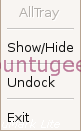
if you right click on the calculator dock you should see the following options
Thanks,
That was really helpful 🙂
very useful, but I was just wondering,
will the settings be saved? I mean after I have decided I want firefox and thunderbird in the tray,
when I restart will they be there ? if not is there a way to make this work?
Thanks in advance for your help!
hi, i’m trying to use it with gnome ubuntu, when i minimize it minimizes stuff to tray, but when i press close button it closes the application and it disappears from the tray. i try to configure it, but i get the message that it’s only usefull to config it with kde. what can i do?
thanks in advance