

Sponsored Link
Network Proxy
Ubuntu has a setting in gnome for the Network Proxy, which should set gnome’s proxy.
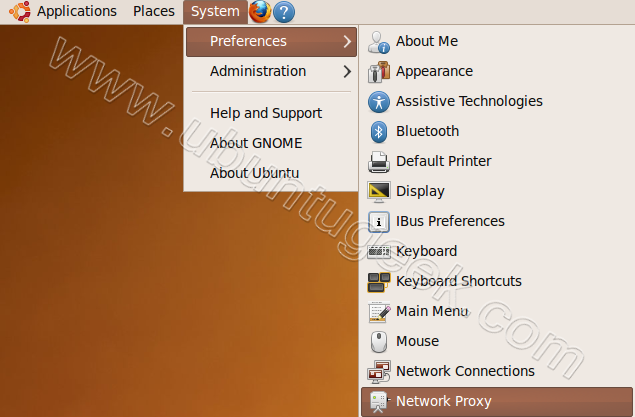
First go to System--->Preferences--->Network Proxy
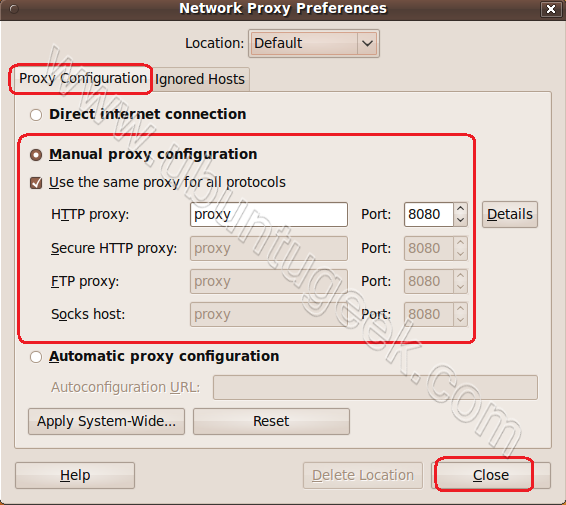
Once it opens click on "Proxy Configuration" and enter your proxy server,port number details click Close.
Synaptic Package Manager
Synaptic Package Manager must have the proxy set, in order to update your installation using the in-built Update Manager or Synaptic GUI.
Go to System--->Administration--->Synaptic Package Manager

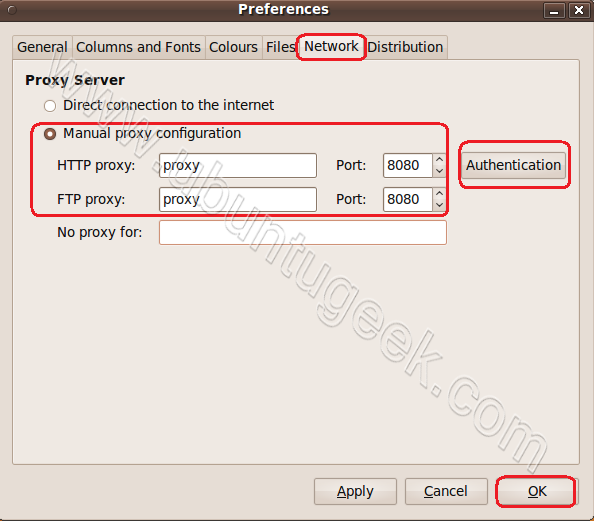
Once Synaptic Package Manager opens click on Settings--->Preferences

Click on Network tab select Manual Proxy Configuration option and enter your proxy server,port details.If you have username,password click on Authentication to enter these details click on ok
Firefox proxy Configuration
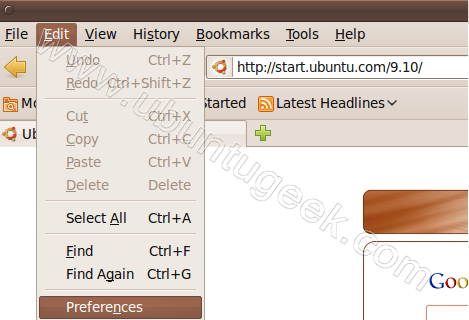
Open your firefox browser go to Edit--->Preferences
Click on Advanced and select Network tab

Select Settings option

Now select Manual Proxy Configuration and enter your proxy server,port details click on ok
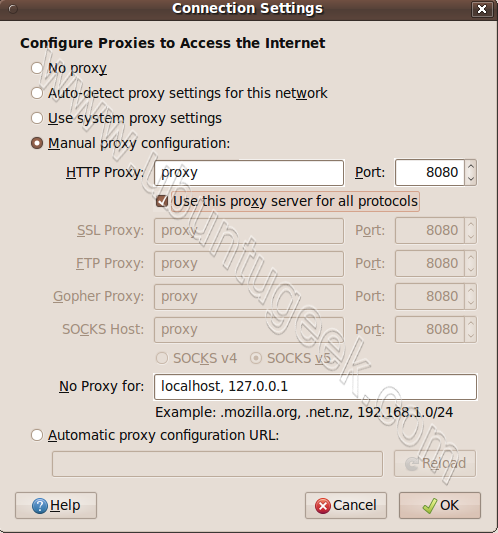
Terminal Proxy
If you want to configure proxy for apt-get,aptitude,wget use the following procedure
First you need to edit /etc/bash.bashrc file
gksudo gedit /etc/bash.bashrc
Add your proxy server details in the following format
export http_proxy=http://username:password@proxyhost:port/
export ftp_proxy=http://username:password@proxyhost:port/
Save and exit the file
Update the source list and you can restart your system
sudo apt-get update
But when the proxy requires an authentication like “domain\user”?
This is my problem, and the terminal dosn’t pass the authentication:
http://domain\user:pass@proxy:8080/ (configured “OK” in firefox)
Also tried:
http://domain/user:pass@proxy:8080/
http://domain\\user:pass@proxy:8080/
http://user:pass@proxy:8080/
Setting up apt-get to use a http-proxy
These are three methods of using apt-get with a http-proxy.
Temporary proxy session
This is a temporary method that you can manually use each time you want to use apt-get through a http-proxy. This method is useful if you only want to temporarily use a http-proxy.
Enter this line in the terminal prior to using apt-get (substitute your details for yourproxyaddress and proxyport).
export http_proxy=http://yourproxyaddress:proxyport
APT configuration file method
This method uses the apt.conf file which is found in your /etc/apt/ directory. This method is useful if you only want apt-get (and not other applications) to use a http-proxy permanently.
IconsPage/info.png On some installations there will be no apt-conf file set up. This procedure will either edit an existing apt-conf file or create a new apt-conf file.
gksudo gedit /etc/apt/apt.conf
Add this line to your /etc/apt/apt.conf file (substitute your details for yourproxyaddress and proxyport).
Acquire::http::Proxy “http://yourproxyaddress:proxyport”;
Save the apt.conf file.
BASH rc method
This method adds a two lines to your .bashrc file in your $HOME directory. This method is useful if you would like apt-get and other applications for instance wget, to use a http-proxy.
gedit ~/.bashrc
Add these lines to the bottom of your ~/.bashrc file (substitute your details for yourproxyaddress and proxyport)
http_proxy=http://yourproxyaddress:proxyport
export http_proxy
Save the file. Close your terminal window and then open another terminal window or source the ~/.bashrc file:
source ~/.bashrc
Test your proxy with sudo apt-get update and whatever networking tool you desire. You can use firestarter or conky to see active connections.
If you make a mistake and go back to edit the file again, you can close the terminal and reopen it or you can source ~/.bashrc as shown above.
source ~/.bashrc
How to login a proxy user
If you need to login to the Proxy server this can be achieved in most cases by using the following layout in specifying the proxy address in http-proxy. (substitute your details for username, password, yourproxyaddress and proxyport)
http_proxy=http://username:password@yourproxyaddress:proxyport
i am using Automatic proxy configuration url in my ubuntu 10.04 as mentioned in my college instructions. so i don’t know the port number. i am using ubuntu for the first time. how can i configure my ubuntu then. plz reply asap.
i was new to ubuntu. i used this above mentioned procedure for my ubuntu 11.04. still my firefox or apt-get
i checked apt-get by installing the package graphviz, here is the result
saikirangvr@ubuntu:~$ sudo apt-get install graphviz
[sudo] password for saikirangvr:
Reading package lists… Done
Building dependency tree
Reading state information… Done
Package graphviz is not available, but is referred to by another package.
This may mean that the package is missing, has been obsoleted, or
is only available from another source
E: Package ‘graphviz’ has no installation candidate
can u please hjelp me……….
here is the result after the next restart
sudo apt-get update
E: Could not get lock /var/lib/apt/lists/lock – open (11: Resource temporarily unavailable)
E: Unable to lock directory /var/lib/apt/lists/
what messed up?
please help me……..
Try this http://www.ubuntugeek.com/how-to-fix-lock-varlibdpkglock-open-11-resource-temporarily-unavailable-error.html
it does not happen in mine as without my proxy configuration i cant install anything………..
Open terminal :
Then past ;
gksudo gedit /etc/apt/apt.conf
then change to
Acquire::http::Proxy “http://username:passward@yourproxyaddress:proxyport”;
Example:
Acquire::http::Proxy “http://KSS:[email protected]:5232”;
sudo apt-get update
I can’t understand what they told for to change the proxy setting for ubuntu terminal.please help me clearly i am new ubuntu .
we are using college server in this every time opening firefox it shows squid proxy caching server require username and password .By giving username and password after enter ok then it shows can access internet , but in terminal we cannot able to update anything
I need Help On Ubntu 11.04 Sqiud
I have made a video for Setting Simple and Authenticated Proxy Settings in Ubuntu 12.04/12.10/13.04/13.10/14.04/14.10 and above 100% Working.
https://www.youtube.com/watch?v=eBtzKa-dvJg
These instructions will configure FIREFOX/mozilla to use the proxy server. The instructions here DO NOT configure Ubuntu to use your proxyserver. In other words, everything that does not use Firefox will be unaffected.
Ludicrous. great that you have ALL the ways of setting the proxy, but why is the first one “System—>Preferences—>Network Proxy” not the only one needed.
why do you then need to go on and set all the others. The O/S is broken if you got to set it in more than one place, Before you rant, Firefox should default to “system settings” and the package manager is PART of the system.
absolutely bizarre.
FWIW you left out what file is updated when you use “System—>Preferences—>Network Proxy”
I made a tool to simplify the entire task. You can download it from himanshushekharb16/ProxyMan (https://github.com/himanshushekharb16/ProxyMan) << this link
Also, you can have a look at the code if you are more interested to know the backend functioning.
Download the zip file,extract them, go to the location of extracted files in terminal and following commands would help you:
bash main.sh : *to set and unset proxy.*
bash proxy_check.sh : *to check your current proxy settings.*