

Sponsored Link
Install C and C++ Compilers in Ubuntu
sudo aptitude install build-essential
This will install all the required packages for C and C++ compilers
Testing C and C++ Programs
Compiling Your first C Programs
Now you need to open first.c file
sudo gedit first.c
add the following lines save and exit the file

Firstly compile the code using the following command
cc -c first.c
that would produce an object file you may need to add to the library.
then create an executable using the following command
cc -o first first.c
Now run this executable using the following command
./first
Output should show as follows
Hello, world
Compiling your first C++ program
If you want to run c++ program follow this procedure
g++ is the compiler that you must use.
you should use a .cpp file extension rather than a .c one
You need to create a file
sudo gedit first.cpp
add the following lines save and exit the file
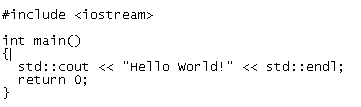
Run your C++ Program using the following command
g++ first.cpp -o test
./test
Output should show as follows
Hello World!
I appreciate this post. I have been able to conquer a few issues. I am trying to figure out how to run programs with qt codes. Right now I am getting error messages:
fatal error: QTextStream: No such file or directory
compilation terminated.
Here is the code. If anyone has any ideas, I will be very grateful!
#include
#include
QTextStream cin(stdin);
QTextStream cout(stdout);
QTextStream cerr(stderr);
int main() {
int num1(1234), num2(2345) ;
cout << oct << num2 << '\t'
<< hex << num2 << '\t'
<< dec << num2
<< endl;
double dub(1357);
cout << dub << '\t'
<< forcesign << dub << '\t'
<< forcepoint << dub
<< endl;
dub = 1234.5678;
cout << dub << '\t'
<< fixed << dub << '\t'
<< scientific << dub << '\n'
<< noforcesign << dub
<< endl:
qDebug() << "Here is a debug message with "
<< dub << "in it." ;
qDebug("Here is one with the number %d in it.", num1 );
}
Thanks! That is work! My text appear “Hello Linux! I love Ubuntu 12.10 because here I can learn C++ for my preparation to be System Programmer! Oh, Hello World! New System Programmer was born from Indonesia”
And I think learn C++ is better than another programming language and become a System Programmer using C++ is funny I think! ?__? Thank you publisher! You was make my spirit improve! 😀
i have ubuntu and i need a c++ compiler…can anyone tell me how to install it..i have been working on c++ for the past one year in windows 7..and i don’t know..how to install the same..in ubuntu
for c++ u used the gcc compiler for linux os
hi,guys i’m using ubuntu 12.10.i want to use turbo c plz help me
sudo aptitude install build-essential dont work for me, i use sudo apt-get install build-essential
There is a syntax error.
sudo apt-get install build-essential
after entering “sudo aptitude install build-essential” it asks me for password ..but my keyboard stops working.. plz help..
I thought mine wasn’t working when I first tried it as well. Type in the password anyway, even though it looks like you aren’t typing on the screen, then press enter. That works for me.
This is the security of ubuntu. it gets typed but you can’t see actually.
ravi@ravidt ~ $ cc -c first.c
first.c:1:19: fatal error: stdio.h: No such file or directory
#include
^
compilation terminated.
can you help please