

Sponsored Link
Clam AntiVirus main features
command-line scanner
fast, multi-threaded daemon with support for on-access scanning
milter interface for sendmail
advanced database updater with support for scripted updates and digital signatures
virus scanner C library
on-access scanning (Linux® and FreeBSD®)
virus database updated multiple times per day (see home page for total number of signatures)
built-in support for various archive formats, including Zip, RAR, Tar, Gzip, Bzip2, OLE2, Cabinet, CHM, BinHex, SIS and others
built-in support for almost all mail file formats
built-in support for ELF executables and Portable Executable files compressed with UPX, FSG, Petite, NsPack, wwpack32, MEW, Upack and obfuscated with SUE, Y0da Cryptor and others
built-in support for popular document formats including MS Office and MacOffice files, HTML, RTF and PDF
Install clamav in ubuntu
sudo aptitude install clamav clamav-daemon clamav-freshclam
This will complete the basic scanner installation.
GTK frontend for the Clam AntiVirus scanner
If you want to install GTK frontend for the Clam AntiVirus scanner in ubuntu you can install avscan or clamtk
This example i am installing clamTK
Download clamtk using the following command
wget http://puzzle.dl.sourceforge.net/sourceforge/clamtk/clamtk_3.05-1_all.deb
Now you need to install clamtk .deb package using the following command
sudo dpkg -i clamtk_3.05-1_all.deb
If you get any problems use the following command
sudo apt-get -f install
This will complete the installation
If you want to open clamtk go to Applications--->Accessories--->Virus Scanner

Once it opens you should see similar to the following screen

If you want to scan your system go to File option from the menu and select which option you want

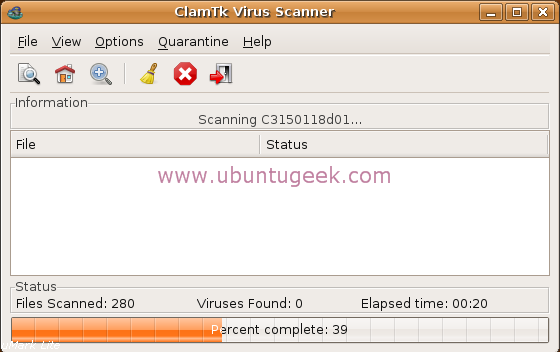
Virus scanning in progress
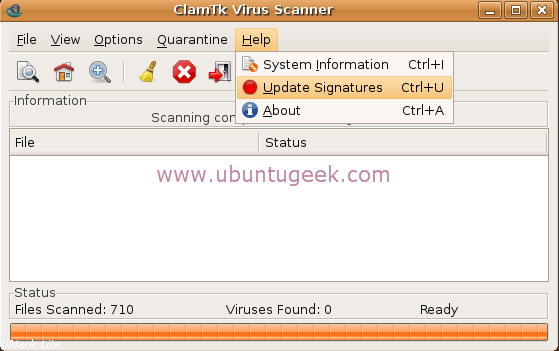
If you want to update virus signatures go to Help--->Update Signatures
Clamtk version details

If you want to install avscan use the following command this is another GUI for clamav
sudo apt-get install avscan
Tried to install the tk front end for clamav but got the following error message.
sudo dpkg -i clamtk_3.05-1_all.deb
Selecting previously deselected package clamtk.
(Reading database … 102395 files and directories currently installed.)
Unpacking clamtk (from clamtk_3.05-1_all.deb) …
dpkg: dependency problems prevent configuration of clamtk:
clamtk depends on libdate-calc-perl; however:
Package libdate-calc-perl is not installed.
clamtk depends on libfile-find-rule-perl; however:
Package libfile-find-rule-perl is not installed.
dpkg: error processing clamtk (–install):
dependency problems – leaving unconfigured
Errors were encountered while processing:
clamtk
MH
try to run the following command
sudo apt-get -f install
Hi. I installed ClamAV with clamtk, but how I make it so that when I click on the Virus Scanner icon, it starts as root? Right now it runs as the mortal user and does not have the privs to update the signatures.
I know I can start it with “gksudo clamtk” but I want to be able to do that via the Virus Scanner icon, please?
I don’t like how this program takes over many system default operations. Is there a way to install it without this behavior?
Aleksey-
I had the same problem, but I changed the launcher command to include “gksudo”. It prompts me, but I can update at least.
# Sudo apt-get install clamav clamav-daemon clamav-freshclam clamtk
Unbutu 8.04 😛
ubuntu 😛 😛
sudo apt-get install libcarp-clan-perl libbit-vector-perl libdate-calc-perl libnumber-compare-perl libtext-glob-perl libfile-find-rule-perl libconfig-tiny-perl
Thanks. Just installing now.
After this operation, 17.4MB of additional disk space will be used.
Do you want to continue [Y/n]? y
Err http://us.archive.ubuntu.com hardy-updates/universe clamav-base 0.92.1~dfsg2-1.1ubuntu0.2
404 Not Found [IP: 91.189.88.46 80]
Err http://security.ubuntu.com hardy-security/universe clamav-base 0.92.1~dfsg2-1.1ubuntu0.2
404 Not Found
Err http://security.ubuntu.com hardy-security/universe libclamav3 0.92.1~dfsg2-1.1ubuntu0.2
404 Not Found
Err http://security.ubuntu.com hardy-security/universe clamav-freshclam 0.92.1~dfsg2-1.1ubuntu0.2
404 Not Found
Err http://security.ubuntu.com hardy-security/universe clamav 0.92.1~dfsg2-1.1ubuntu0.2
404 Not Found
Failed to fetch http://security.ubuntu.com/ubuntu/pool/universe/c/clamav/clamav-base_0.92.1~dfsg2-1.1ubuntu0.2_all.deb 404 Not Found
Failed to fetch http://security.ubuntu.com/ubuntu/pool/universe/c/clamav/libclamav3_0.92.1~dfsg2-1.1ubuntu0.2_i386.deb 404 Not Found
Failed to fetch http://security.ubuntu.com/ubuntu/pool/universe/c/clamav/clamav-freshclam_0.92.1~dfsg2-1.1ubuntu0.2_i386.deb 404 Not Found
Failed to fetch http://security.ubuntu.com/ubuntu/pool/universe/c/clamav/clamav_0.92.1~dfsg2-1.1ubuntu0.2_i386.deb 404 Not Found
E: Unable to fetch some archives, maybe run apt-get update or try with –fix-missing?
Help!
@ try to run the following command
sudo apt-get update
after this try your installation command
Hello at all,
I use Ubuntu 8.10 and ClamTK 3.11. How can i change the language from english to german??
I cannot update clamtk because it says I have to be root to do so
I m pretty new to linux and using Ubuntu 8.10
Can anyone help me?
thx
Yeah I am having the same problem. How do I update it says I have to be root to update.
TJ and Mike,
To update under root run , sudo apt-get update
sudo is root it will ask for a password (use the one you entered during install) , you will not be able to see your password being typed this is normal.
Thank you for posting this
Thank you. V helpful. Though can you just clarify if I run sudo apt-get update that means I up dating the anti-virus data base??
no if you run sudo apt-get update, you are updating your repository listing…(sudo apt-get update is ran before a sudo apt-get upgrade to update your ubuntu files–it is the command line way of running system update)
in the program clamtk you can run update to update the anti-virus database
How do you expect your readers to enjoy this blog, with a Google add on Internet Explorer 8 staring at their face?
Hi.
I installed Clam AV using commands indicated, but when I try to update virus firm I get message “upgrade to “clamav-0.96.5”
I downloaded the tar.gz file
When I run ./configure, I get message
“checking build system type… i686-pc-linux-gnu
checking host system type… i686-pc-linux-gnu
checking target system type… i686-pc-linux-gnu
creating target.h – canonical system defines
checking for a BSD-compatible install… /usr/bin/install -c
checking whether build environment is sane… yes
checking for a thread-safe mkdir -p… /bin/mkdir -p
checking for gawk… no
checking for mawk… mawk
checking whether make sets $(MAKE)… yes
checking how to create a ustar tar archive… gnutar
checking for gawk… (cached) mawk
checking whether ln -s works… yes
checking whether make sets $(MAKE)… (cached) yes
checking for style of include used by make… GNU
checking for gcc… gcc
checking whether the C compiler works… no
configure: error: in `/usr/src/clamav-0.96.5′:
configure: error: C compiler cannot create executables”
gcc is installed in my system
please give some help
Regards
Seems to work on one PC. I had installed it on another but am having problems
Can anyone telle me how to remove it ?
I would try using:
apt-get –reinstall install
Then if that doesn’t work remove it using:
apt-get remove –purge
@Sanket Totewar:
by using adblock