

Sponsored Link
Preparing your System
1. Install build-essential and libgtk2.0-dev packages:
sudo apt-get install build-essential libgtk2.0-dev
2. Download Nodoka GTK+ engine 0.6 from here.
3. Extract tarball package:
tar zxvf gtk-nodoka-engine-0.6.90.2.tar.gz
4. Now go to gtk-nodoka-engine-0.6 directory:
cd gtk-nodoka-engine-0.6.90.2
5. Configure:
./configure --prefix=/usr --enable-animation
6. Make:
make
7. Install:
sudo make install
Install theme
1. Get Nodoka theme 0.3.2 from here.
Then execute command in terminal:
tar zxvf nodoka-theme-gnome-0.3.90.tar.gz
2. Copy the Nodoka folder to themes folder:
cd nodoka-theme-gnome-0.3.90
sudo cp -r Nodoka/ /usr/share/themes/
Use theme
Click System -> Preferences -> Theme menu command. In Theme Preferences dialog, choose Nodoka item.
Screenshot:
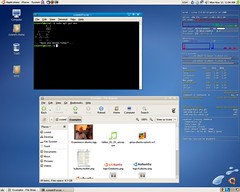
You can find other usefull things at http://cviorel.rdscv.ro.
Here’s the .deb for i386: http://ubuntu-debs.googlecode.com/files/gtk-nodoka-engine_0.6-1_i386.deb
You’ll still need to follow the above instructions to install the theme, this is just the engine.
What is that app that displays all the system info on the desktop?
I use conky to show me that stuff on the desktop.
i am getting an error, as to the file or the dir not found.
is there any specific place i have tosave the engine.. so that it can be tar ed
Can’t you just download gtk2-engines-nodoka?