

Sponsored Link
Features
* Set specific MAC address of a network interface
* Set the MAC randomly
* Set a MAC of another vendor
* Set another MAC of the same vendor
* Set a MAC of the same kind (eg: wireless card)
* Display a vendor MAC list (today, 6800 items) to choose from
Possible usages
These are some examples:
* You're in a DHCP network with some kind of IP-based restriction
* You've a cluster that boot with BOOTP and you want to have a clean set of MACs
* Debug MAC based routes
Install macchanger in Ubuntu
sudo apt-get install macchanger macchanger-gtk
Command line Examples
# macchanger eth1
Current MAC: 00:40:96:43:ef:9c [wireless] (Cisco/Aironet 4800/340)
Faked MAC: 00:40:96:43:ef:9d [wireless] (Cisco/Aironet 4800/340)
# macchanger --endding eth1
Current MAC: 00:40:96:43:e8:ec [wireless] (Cisco/Aironet 4800/340)
Faked MAC: 00:40:96:6f:0f:f2 [wireless] (Cisco/Aironet 4800/340)
# macchanger --another eth1
Current MAC: 00:40:96:43:87:1f [wireless] (Cisco/Aironet 4800/340)
Faked MAC: 00:02:2d:ec:00:6f [wireless] (Lucent Wavelan IEEE)
# macchanger -A eth1
Current MAC: 00:40:96:43:39:a6 [wireless] (Cisco/Aironet 4800/340)
Faked MAC: 00:10:5a:1e:06:93 (3Com, Fast Etherlink XL in a Gateway)
# macchanger -r eth1
Current MAC: 00:40:96:43:f1:fc [wireless] (Cisco/Aironet 4800/340)
Faked MAC: 6b:fd:10:37:d2:34 (unknown)
# macchanger --mac=01:23:45:67:89:AB eth1
Current MAC: 00:40:96:43:87:65 [wireless] (Cisco/Aironet 4800/340)
Faked MAC: 01:23:45:67:89:ab (unknown)
# ./macchanger --list=Cray
Misc MACs:
Num MAC Vendor
--- --- ------
065 -- 00:00:7d -- Cray Research Superservers,Inc
068 -- 00:00:80 -- Cray Communications (formerly Dowty Network Services)
317 -- 00:40:a6 -- Cray Research Inc.
Macchanger GUI
You can open the gui by running the following command from your terminal
$ macchanger-gtk
Screenshot
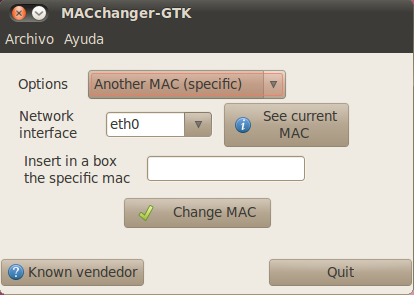
This is how this should be done:
sudo ifconfig eth0 down
sudo ifconfig eth0 hw ether 00:a0:WH:AT:EV:ER
sudo ifconfig eth0 up
No need for third party software.
And the point ‘* You’re in a DHCP network with some kind of IP-based restriction’ is paradoxic, since you would need an internet connection in the first place to install the program before you change the mac in order to log onto the network.
Petur,
I agree that I shouldn’t need 3rd party app although macchanger would work. I dont really want to ‘ifconfig’ every single time I reboot. It seems to me that this could be configured somewhere?
Sometimes I work remotely and it would be tedious to re-configure it. This server is acting as a web development box (the reason I want multiple addresses).
Thanks,
Jason
Too bad there isn’t a Macchanger for other linux distros. Open Suse, PCLinuxOS, Puppy, to name a few.
Another feature would be to automatically randomize the mac addresses for both LAN and WiFi without user intervention each time you restart or log back in.
Macchanger DOES help with avoiding others who wish to track you.
Perhaps have it do more? Alter the reported unique ID of the system? Perhaps when negotiating a connection it reports a blank for the operating system you are using or at least select one randomly.
If done correctly, Macchanger could be a valuable privacy tool. But it needs to be significantly expanded to encompass all the tracking issues.
sudo service network-manager stop && macchanger -r wlan0 && sudo service network-manager start