

Sponsored Link
Install Pybackpack in Ubuntu
sudo aptitude install pybackpack
This will install all the required packages for Pybackpack.
Using Pybackpack
Backup Using Pybackpack
First you need to go to System--->Administration--->File Backup Manager

Once it opens you should see similar to the following screen
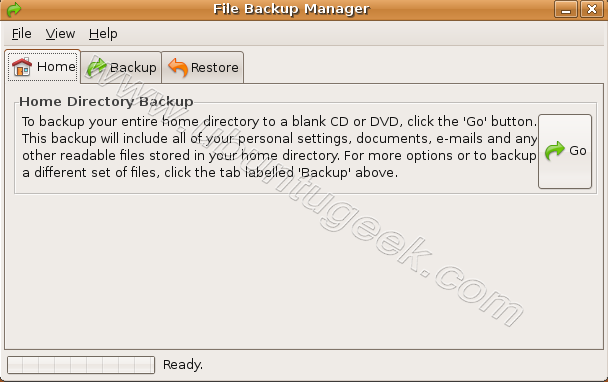
Click on backup tab Here you need to click on New to create new backup set

Welcome screen click on Forward

Now you need to enter your backup name,description,destination type,default destination click on Forward
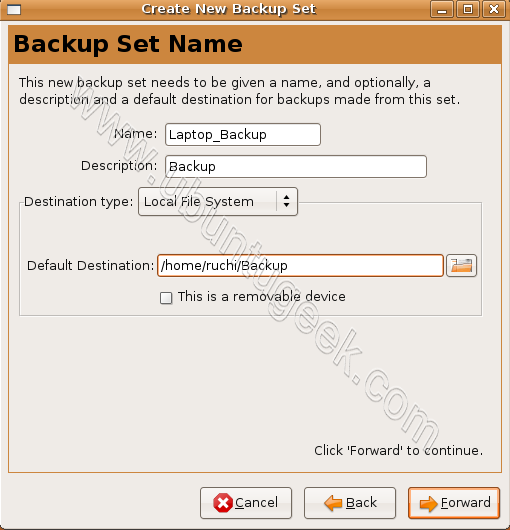

Here you need to select which files,folders to include,exclude in backup click on Forward
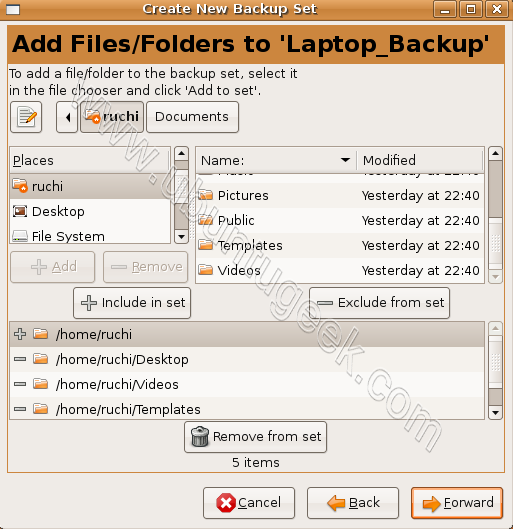
Summary of your backup selection click on Forward
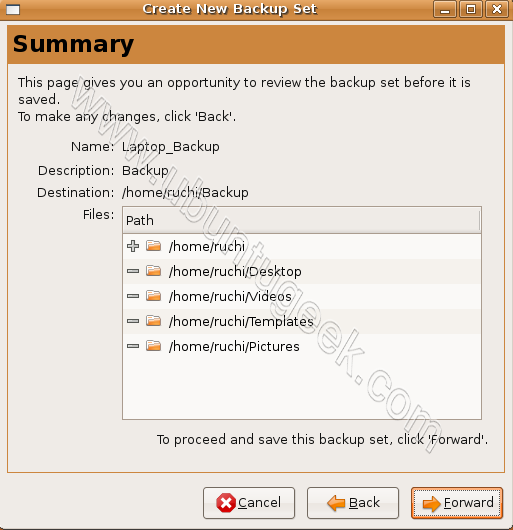
This will complete the backup set setup click on apply. Now you can use this backup set to backup your config files in a single click

You need to select your backup set and click on Backup

After completing backup you should see similar to the following screen

Restore Backup
If you want to restore your files you need to select restore tab

Select restore location,date and time click on restore
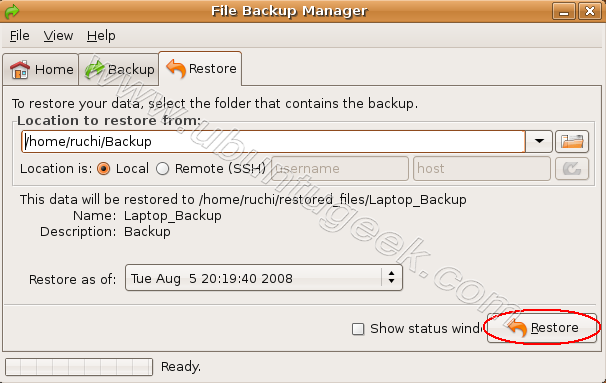
Restore process is in progress

If you want to see ststus windows click on check box next to status windows

Hi,
Thanks for that. I’ve been looking to back-up my Notebook to an external HDD forever.
I want all those “hidden” files, plus make the back-up bootable should I lose my system as I have often enough. LOL!
Can this be scheduled with cron? Or does it have some sort of built in scheduler or anything?
Looks like this would be a good tool, I’d like to be able to set it up to do nightly backups of my desktop(s) at home.
@Jason
Can this be scheduled with cron? Or does it have some sort of built in scheduler or anything?
You don’t have to use cron this is having built-in feature which does for you.
quote: Can this be scheduled with cron? Or does it have some sort of built in scheduler or anything?
You don’t have to use cron this is having built-in feature which does for you.
OK, where? How? The screenshots above do not show how to schedule a backup, and I cannot find how to do it by exploring the UI.
Some documentation and/or examples here, please? TIA!
1. Are there controls for “full backup” and “incremental backup”, or does PyBackPack simply produce a full backup each time it’s run for a particular backup set?
2. How is /tmp/… cleaned up, or is that left to the user?
3. Can DVD/CD RW media be automatically erased/init’d for reuse? Or is that manual?
4. What happens if/when removable media (DVD/CD, etc.) fills up? Is “next volume” mounted/handled automatically? Or is there a strict limit as to backup set size relative to size-of-media?
TIA again!
Bug report? Two tries at backing up my /home… tree, both stall when “Starting to burn CD.” Here’s the latest transcript/progress:
Tue Sep 30 01:02:03 2008: Starting backup of ‘home’ to CD
Tue Sep 30 01:02:03 2008: Analysing backup source.
Tue Sep 30 01:02:12 2008: Backup source analysis complete.
Tue Sep 30 01:02:12 2008: Creating temporary backup in /tmp
Tue Sep 30 01:13:14 2008: Creating CD image.
Tue Sep 30 01:24:28 2008: Starting to burn CD.
At the last phase, “Starting to burn CD”, system goes idle: very little CPU activity, file system is idle, and process “python” is “sleeping”. No DVD-drive lights flashing… as far as PyBackPack is concerned at this point, well, “It’s dead, Jim.”
I’m using new Verbatim DVD+RW medium, fresh out of the case.
What gives here? Any ideas or help? Thank you!
Nice little program with some limitations. Made a local directory backup as described in the post perfectly. Restored just as well. What it fails at is creating a DVD at the same place Lorin posted having a problem. Difference being I actually got an exception, creation of cd image failed or something to that effect. For me the primary issue is the simplicity of making a local backup but the ability to burn to a disk would be nice. In something that may or may not be related I also tested to see if I could burn a CD using the same method as the local file backup. Nada, nyet. It complains that I do not have write access to a file /tmp/pybackpack.cdimage (which in fact I do have write access). I am guessing this is a scripting error but no time to delve further at the moment. I would also suspect that we would not be the first to see it. If I find anything I will post back.
All in all thanks for this one, I like the simplicity and probably would not have found it otherwise. I love python stuff so it has the added value of something to play with.
Thanks for sharing the info. While I’m not worried at all about my Ubuntu install failing backing up is always prudent. Thanks!
Nice program. Thank you for it.
I am also looking for something that will give me a bare-metal restore option in a GUI environment. Any suggestions?
Thanx!
zeddock
Lorin:
I suffered the same bug you did- I was backing up to an external HD rather than an optical drive. The program works on occasion but too often stalls and does nothing.
Unfortunately, many of the interesting looking GUI backup programs for home users (e.g., Simple Backup, Pybackpack) are still too buggy for a task like data backup. I think the command line backup/sync tools remain the smart choice- they require some effort to learn and set up but have less quirks than these GUI front-ends.
Hi All,
I have worked with a lot of the back-up systems out there, NONE seem to capture my hidden files.
What I am looking to do is make my external HDD bootable. That would be the ultimate back-up app.
By this I mean. save my entire OS and files on a regular basis to ensure against disaster.
Rich — Thanks for the sanity-check & confirmation that the problems I was seeing are not unique to me/my system. I agree with you that com-line tools & scripts are currently the probable best-bet for serious backups. Given the distance between this post and my original posted inquiries (several weeks), it is clear that the original developer of PyBackpack is not actively monitoring this discussion, nor is he (apparently) developing and maintaining his application.
I’m uninstalling PyBackpack and moving on… still looking for a seriously useful backup GUI, but without high hopes… 😉
I can’t tell you how hard I have been looking for a GUI for scheduled backup utility like acronis or paragon, and the original developer said it could, then…. no answers as to how???? Just a little short of the mark…sad 🙁
Eu totusi o sa instalez mai bine Ubuntu Studio.
i want to know if there is a sofeware can work when my grub is broken.
Tried this with karmic koals (9.10) alpha, but this package depends on python-nautilusburn which is not installable any more (universe and mulitverse are enabled).
Hope the developer will fix this dependency in future versions.
I think that “BACKUP” tab has a misleading name and that should be renamed to “DETAILS”, “FILES”, “OTHER” , “ADVANCED”,…or whatever
becasue “BACKUP” is everything
2. OK I kow how to press the buttons and do the things but I don’t know exactly what is going to happen after. The whole backup is in one file?
Do I know the name of the (succesive?) file(s)?. How many?. How to choose for restore?
Anyway it seems great Interface.
Congratulations!
I’ve installed Ubuntu 11.10 and I tried to setup pybackpack on it, but there is an error. Trough Synaptic also I couldnt install the backup tool. An error message says that the package is broken.
Gall, I recommend better install the tools “lucky backup” (which has the same and more features than pybackup, but not dvd/cd). Or use “dejadup”, the default backup tool for ubuntu.
If you like to burn to dvd/cd you can easily script lucky-backup.
This article is from 2008 😉 And as far as i can see on the developer homepage of pybackpack the last commit is 22 month ago!
That my opinion and might not be what you want, but software changes 😉
Thanks a lot, Axel, for your help. I’ve already seen the app dejadup and I found it nice. I’ll use it then.