
Ubuntu Geek

Ubuntu Linux Tips,Howtos&Tutorials|Edgy,Feisty,Gutsy,Hardy,Intrepid

  • RSS Feed

    subscribe to the ubuntu Geek RSS feed


  • Sponsor


  • Categories

  • Meta

  • Sponsor

  • Archives

  • Support Ubuntugeek

    Amount $:
    Website(Optional):


  • Favourite Sites

Upgrade Ubuntu 6.10 (Edgy Eft) to Ubuntu 7.04 (Feisty Fawn)

Posted by admin on April 19th, 2007 Email This Post Email This Post

Ubuntu 7.04 is the current stable version of the Ubuntu operating system. The common name given to this release from the time of its early development was “Feisty Fawn”.

Before Upgrading You need to remember the following point

Take comple backup of your system before upgrading .Now you need to upgraded  Ubuntu Edgy Machine to Ubuntu Feisty.

We can Use Two methods to upgrade Ubuntu Edgy to Ubuntu Feisty

1) Using GUI

2) Using apt-get

Upgrading Ubuntu Edgy to Ubuntu Feisty

Method 1 - Using GUI

If you want to upgrade using GUI use the following command

gksu “update-manager -c ”

“-c” switch tells it to look for upgrades at all.

You should see the following screen here Now you can see 7.04 is available for upgrade click on upgrade

Now you should see the release notes as follows here you need to click on upgrade

Once you click on upgrade you might get the error “Authentication failed”

You need to fix the above error for this open the terminal and type the “gpg” and press enter once you see the following message

gpg:Go ahead and type your message …

Press Ctrl+C and then start the install process again.

Now you should see the following screen downloading upgrade tool

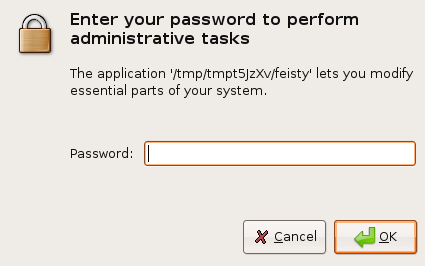
You need to enter root password and click ok
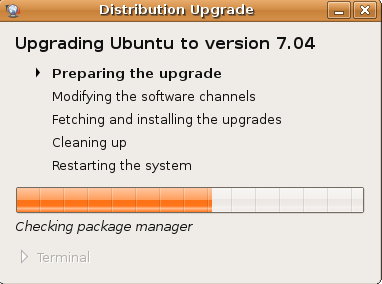
Preparing the upgrade in progress
You need to confirm the upgrade process by clicking “Start Upgrade”

Download in progress for all the required packages for Upgrade

Installation in progress

If you click on Terminal to see detailed installation in progress

Cleaning Up is in Progress

You need to restart the system to complete the Upgrade by clicking “Restart Now”

Method 2 - Using apt-get

Edit your /etc/apt/sources.list as root. Change every occurrence of edgy to feisty.

Use any prefered editor. If you have a CD-ROM line in your file, then remove it.

sudo vi /etc/apt/sources.list

or

use the following Simple command

sudo sed -e ’s/\edgy/ feisty/g’ -i /etc/apt/sources.list

Now you need to update the source list using the following command

sudo apt-get update

Upgrade using the following command

sudo apt-get dist-upgrade

Double check your process was finished properly using the following commd

sudo apt-get -f install

sudo dpkg --configure -a

Now you need to Reboot your machine to take your new ubuntu 7.04 installation to effect all changes.

Testing Your Upgrade

You can check the ubuntu version installed using the following command

sudo lsb_release -a

Output Looks like below

Distributor ID: Ubuntu
Description: Ubuntu feisty (development branch)
Release: 7.04
Codename: feisty

or

Just type the following command in your terminal

cat /etc/issue

Output Lokks like below

Ubuntu feisty (development branch) \n \l

Share/Save/Bookmark

If you want to be notified the next time we write something please subscribe to our RSS feed.Thanks for Visiting!

Related Articles

46 Responses to “Upgrade Ubuntu 6.10 (Edgy Eft) to Ubuntu 7.04 (Feisty Fawn)”

  1. kunchi Says:

    i get this what is wrong?
    sudo sed -e ’s/\edgy/ feisty/g’ -i /etc/apt/sources.list

    sed: -e expression #1, char 1: unknown command: `

    please correct me if I did something wrong

  2. dave Says:

    try to use this and check

    sudo sed -e ’s/\sedgy/ feisty/g’ -i /etc/apt/sources.list

  3. kunchi Says:

    same thing i just did:
    sudo gedit /etc/apt/sources.list

    and then used the replace function to look for edgy and replace with feisty so now it should work

    thanks not sure why the sed is not working

  4. The Technocrat Says:

    sed command doesn’t work for me either. find/replace works fine.

  5. beijing Says:

    what about upgrades using the alternate CDs? it should be another method to upgrading.

  6. jbeiter Says:

    this:
    ——————————————————-
    If you want to upgrade using GUI use the following command

    gksu “update-manager -c ”
    ———————————————————-

    did not work at all…

    jwb@jwb-laptop:~$ gksu “update-manager -c ”
    gksu: invalid option — c
    GKsu version 1.9.3

    Usage: gksu [-u ] [options]

    jwb@jwb-laptop:~$ cat /etc/issue
    Ubuntu 6.10 \n \l

  7. admin Says:

    try to use gksudo “update-manager -c “

  8. www.tipshack.com Says:

    Upgrade Ubuntu 6.10 (Edgy Eft) to Ubuntu 7.04 (Feisty Fawn)…

    Upgrade Ubuntu 6.10 (Edgy Eft) to Ubuntu 7.04 (Feisty Fawn)…

  9. jbeiter Says:

    Is there a problem with automatix or a way to get around the following fatal error?

    http://www.getautomatix.com/apt/dists/edgy/main/binary-i386/Packages.bz2: Sub-process bzip2 returned an error code (2)

    The installer keeps bombing with complaints ranging from potential network problems to protests that bzip2 is not a bzip2 file.

  10. Scriptwriter Says:

    For the people who can’t get sed to work, the problem is that you can’t just copy and paste from this page. It uses the wrong quote mark. The best way to get this to work (which worked for me) is to copy the command above, paste it into your terminal, and then replace the quote marks in the command with a single quote from your keyboard.

  11. Kevin Says:

    I Also get the following.

    kjames@fluffybunny:~$ gksudo “update-manager -c “
    gksudo: invalid option — c

    I did a direct cut and paste from the webpage. Is there something that needs to be installed first?

  12. Kevin Says:

    OOPS. I typed mine in before reading the comment about the quotes. That fixed it for me.

  13. Jack Says:

    My attempt to upgrade, whether using the GUI of command line, freezes on the following.

    Err http://packages.freecontrib.org dapper Release.gpg
    Could not connect to packages.freecontrib.org:80 (88.191.33.6), connection timed out

  14. Jack Says:

    Correction: After about 6 connection timeouts, which takes quite some time, the command line upgrade does seem to continue. Whether it’s all OK or not, time will tell.

  15. Brian Says:

    After install finished all the text on the screen…and everywhere else except in terminal window is a rectangular “0″ or “O”. How can I fix this? During download there were a number of programs that did not finish properly…server timed out or temporarily dropped the connection. I must be missing some necessary component.

  16. Benoit Says:

    Command line method should work, but prefer using aptitude instead of apt-get (same syntax). Aptitude handles dependencies better than apt-get.
    On my installation I have Apache 2 + php 5, upgrading to apache 2.2 broke my php5 install (apache 2.2 doesn’t restart with 2.0 modules) with apt-get, and also broke the dist-upgrade process.
    So tell configurator not to restart apache, or use aptitude.
    Benoit

  17. RD jones Says:

    Thanks, finally got updated. Tried the ‘official’ way and it hosed @ 891 files. This finished it up nicely. Again, a great big THANKS!

  18. jbeiter Says:

    Once I got past automatix (figure out where to remove it from the sources list) the upgrade went through like clockwork.

    Recompiled Nvidia and everything is nice.

    VMWare is a little fussy in the aftermath. Updated with the latest bleeding edge patch and networking had to be kludged with NAT but that appears to be the biggest problem.. pretty minor IMO.

    This is a Dell 820 Laptop. Nice work guys.

  19. Xy Says:

    Hi all, i have a little problem with my java version, i heard the java version is supposed to be the latest java version on Ubuntu 7.04 but i checked after the upgrade(from 6.10 to 7.04) and the java version is still 1.4.2(default system-wide java version on 6.10). How can i upgrade the java version and how can i make it replace the native java version(so it will be a system-wide java instead of a local java) I need to know to make frostwire works properly.

    Tx in advance for your replies.

  20. admin Says:

    You need to install the latest java packages try this

  21. Xy Says:

    Already tried it and still the same thing, the newly installed java isnt usable and when i type “java -version” in terminal i still get the same thing telling me the java version is 1.4.2.

  22. admin Says:

    one more option is remove java completely both the versions and install the latest version

  23. Xy Says:

    I’ll try that tx. Lets cross our finguers and wish it will work.

  24. Xy Says:

    GREAT It works !!! Tx for your help i realy apreciate it :)

  25. mrjared Says:

    Heres my problem, I’ve install ubuntu ultimate edition base on edgy eft 6.10 and want to upgrade to 7.04 with a cd but I want to keep the interface of ultimate edition. How would I go by doing this????

  26. ezekiel Says:

    How to upgrade using the Ubuntu 7.04 Feisty Fawn CD?

    sudo apt-cdrom add
    sudo aptitude dist-upgrade

    is that all? Do I have to replace every occurrence of edgy to feisty as said in Method 2?

  27. admin Says:

    follow this procedure if you want to upgrade ubuntu edgy using cdrom

    make sure you have the alternate install CD, you can save bandwidth by loading the CD into your CD-ROM drive and using
    sudo apt-cdrom add
    Perform the upgrade
    sudo apt-get update
    sudo apt-get upgrade
    sudo apt-get dist-upgrade
    Just to be totally sure that everything is installed properly, run these commands
    sudo apt-get update
    sudo apt-get dist-upgrade
    sudo apt-get -f install
    sudo dpkg --configure -a
    Running dist-upgrade again is done to ensure that no packages are left to install or upgrade. In some cases, certain packages fail to install even after running dist-upgrade the second time.
    Reboot in order to effect all changes.

  28. Mamsaac Says:

    I upgraded using last method (from CD) and all is perfectly working. Thanks.

  29. Sas3 Says:

    I tried the last 2 methods - both without success.
    For method in (27) above, only the
    sudo apt-cdrom add
    read the cdrom (and unmounted it immediately).
    None of the other commands accessed the cdrom.
    The “dist-upgrade” did just this:

    Reading package lists... Done
    Building dependency tree
    Reading state information... Done
    Calculating upgrade... Done
    The following packages have been kept back:
    libc6-dev
    0 upgraded, 0 newly installed, 0 to remove and 1 not upgraded.

    The whole process was over in about a minute…
    What might I be doing wrong?
    Thanks for any help.

  30. Sas3 Says:

    Oops where did that last post “30″ go?

    Anyways, trying again:
    …continuing from post 29 …
    I also tried replacing all instances of “edgy” with “feisty” in /etc/apt/sources.list.

    I did list out 600+ upgrades, but it still isn’t reading from the cdrom. I tried this with the cdrom mounted, as well as unmounted (apt-cdrom had unmounted it). No luck. :-(

  31. enrico Says:

    hello

    i’m trying to upgrade from 6.10 to 7.04, using gui, i got these errors
    ” Failed to fetch http://packages.freecontrib.org/ubuntu/plf/dists/edgy/free/binary-i386/Packages.gz 404 Not Found
    Failed to fetch http://packages.freecontrib.org/ubuntu/plf/dists/edgy/non-free/binary-i386/Packages.gz 404 Not Found
    Failed to fetch http://packages.freecontrib.org/plf/dists/dapper/free/binary-i386/Packages.gz 404 Not Found
    Failed to fetch http://packages.freecontrib.org/plf/dists/dapper/non-free/binary-i386/Packages.gz 404 Not Found”

    anyone can give me an advise about how to solve the problem?

    thanks

  32. admin Says:

    @enrico

    you need to edit your /etc/apt/sources.list file and commentout freecontrib source list and save that file.

    then do the following
    sudo apt-get update
    then proceed your upgrade

  33. Vikas Hazrati Says:

    I am trying to upgrade for edgy to fiesty and when i use the upgrade manager or sudo apt-get update i get this error message

    Get:5 http://in.archive.ubuntu.com edgy/main Sources [365kB]
    99% [5 Sources gzip 0]
    gzip: stdin: not in gzip format
    Err http://in.archive.ubuntu.com edgy/main Sources
    Sub-process gzip returned an error code (1)
    Fetched 5B in 5s (1B/s)
    Failed to fetch http://in.archive.ubuntu.com/ubuntu/dists/edgy/main/source/Sources.gz Sub-process gzip returned an error code (1)
    Reading package lists… Done
    E: Some index files failed to download, they have been ignored, or old ones used instead.

    As a result of this the upgrade stops.

    How do i resolve this?

  34. enrico Says:

    hi

    thank you, now everything is working fine, updated.

  35. martin Says:

    I’m try with gpg option, but still have the same error. What’s going on?

    I’m using apt-cache repository and set gpg too in my server.

    It’s need to open spesific repository?

  36. martin Says:

    I get this error:

    Failed to fetch http://192.168.1.1:3142/ubuntu/pool/main/v/vim/vim-runtime_7.0-164+1ubuntu7_all.deb Connection timed out

    Could not download the upgrades.

    Anyone does know what’s going on?

  37. Bipin Khairnar Says:

    Hi All,

    If you are upgrading using GUI use the following command

    gksu “update-manager -c ”

    Please type this command manually don’t use copy paste from use quote is problem..

  38. Ifrgtmyname Says:

    Ok so im updating and i get this error message:

    http://img489.imageshack.us/img489/9351/frickingayanoyinmessagegb0.png

    i have tried lots of things but nothing works

    It couldnt be to do with internet usage and the fact that my isp keeps blocking access to p2p programs could it?– just a suggestion — Keep an open mind ;)

  39. Psychoscorpic Says:

    I tried the CD methods above & they failed to read the disk.
    However, I then used Synaptic.

    Simply “Add a CD-ROM” with Synaptic, point to the Alternative CD (since it has the DEB files) - et voila! It worked perfectly.
    About 45 minutes.

    Had to upgrade WINE and reinstall an app via it, but everything else works perfectly.

  40. MethoD Says:

    How to upgrade live cd version of Ubuntu 7.04 to dvd version of Ubuntu 7.04 using iso file on hard drive?

  41. andyhl Says:

    i tried everything but i cant upgrade.i used synaptic but it say insert another cd-rom..im using dapper trying to upgrade to feisty fawn..

  42. Leonardo Says:

    Andyhl:
    you cant’ jump versions… Dapper must upgrade to
    Edgy before go to Feisty

  43. LeeMcK Says:

    For me, the upgrade using command line steps did not go smoothly.

    The problems showed up when running “apt-get -f install”

    Many packages I installed created a conflict that blocked the installation process from running to completion. Basically my entire graphical desktop was wiped out.

    The important thing was Do not use the Ubuntu 7.04 Install CD because that would possibly wipe out my /home/ directories.

    Being cautious (and extremely pissed off at my own stupidity) I backed up my entire /home/user/ directory using tar and sftp to another available computer in my home. 19 GB, ugh.

    Then I repeatedly ran “sudo apt-get -f install” and manually removed each package that was appearing in the conflicts list.

    Then I began stumbling around trying to install the packages that make graphics work. A key step was to install the x-server packages and then run:

    sudo dpkg-reconfigure xserver-xorg ; this sets your hardware and keyboard for X display

    Then, by trial and error I finally loaded a package ubuntu-desktop that gave me back the familiar graphic front end.

    Typical remove step required to make apt-get -f install show no conflicts:
    628 sudo apt-get -f remove grass grass-dev grass-doc libgdal1-1.3.2-grass qgis-plugin-grass gdal-bin libgl1-mesa-dri libmetacity0 metacity python-gnome2-desktop gedit gnome-games
    629 sudo apt-get remove acpid
    637 sudo apt-get -f install
    642 sudo apt-get remove acpi-support acpid powermanagement-interface
    643 sudo apt-get -f install
    658 sudo apt-get install ubuntu-standard
    660 sudo apt-get -f install
    700 sudo apt-get installation-guide-i386
    941 sudo apt-get install xserver-xorg
    970 sudo apt-get install xfonts-base
    973 sudo apt-get install xfonts-100dpi
    978 sudo apt-get install xfonts-75dpi
    984 sudo apt-get install ubuntu-desktop
    987 sudo apt-get -f install
    990 sudo apt-get remove acpid
    991 sudo apt-get -f install
    992 sudo apt-get install ubuntu-desktop
    994 history | grep apt-get > aptgetfile

  44. Ainz Says:

    I recommend a manual install into /opt after downloading the bin from Sun; the following is for Java6u1.

    sudo chmod +x jdk-6u1-linux-i586.bin
    sudo sh ./jdk*.bin
    sudo mv jdk1.6.0_01 /opt
    sudo update-alternatives –install /usr/bin/java java /opt/jdk1.6.0_01/bin/java 1
    sudo update-alternatives –install /usr/bin/javac javac /opt/jdk1.6.0_01/bin/javac 1
    sudo update-alternatives –config java
    sudo update-alternatives –config javac

    This gives you the option of having the latest version (independent of the Ubuntu repositories), and to keep multiple versions installed side-by-side for development if you require.

    Hope someone finds this useful.

  45. buckbugs Says:

    im updating using command line but after a while i get this error…. i don know what to do… kindly please help me….

    Preparing to replace libblkid1 1.39-1 (using …/libblkid1_1.39+1.40-WIP-2006.11.14+dfsg-2ubuntu1_i386.deb) …

    Unpacking replacement libblkid1 …

    Errors were encountered while processing:

    /var/cache/apt/archives/language-pack-en_1%3a7.04+20070601_all.deb

    E: Sub-process /usr/bin/dpkg returned an error code (1)

  46. dave Says:

    Is there any drawbacks with just upgrading and and not re-installing?

Leave a Reply

XHTML: You can use these tags: <a href="" title=""> <abbr title=""> <acronym title=""> <b> <blockquote cite=""> <cite> <code> <del datetime=""> <em> <i> <q cite=""> <strike> <strong>