

Sponsored Link
Several other PDF-editing programs allow some minimal editing and adding of features to documents, and come with other
modules including a printer driver to create PDF files.
In Ubuntu Gutsy Gibbon Acrobat Reder is not in Main Repositories because of licensing issues so you need to install using one of the following methods
Using medibuntu Repository
Medibuntu (Multimedia, Entertainment & Distractions In Ubuntu) is a repository of packages that cannot be included into the Ubuntu distribution for legal reasons (copyright, license, patent, etc).
Add gpg key using the following command
wget -q http://packages.medibuntu.org/medibuntu-key.gpg -O- | sudo apt-key add --
Edit sources.list with new repo data
sudo wget http://www.medibuntu.org/sources.list.d/gutsy.list -O /etc/apt/sources.list.d/medibuntu.list
Update the source list using the following command
sudo apt-get update
Install acrobat reader 8.1.1 with firefox plugin in Ubuntu
sudo apt-get install acroread mozilla-acroread acroread-plugins
This will complete the installation of acrobat reader version 8.1.1
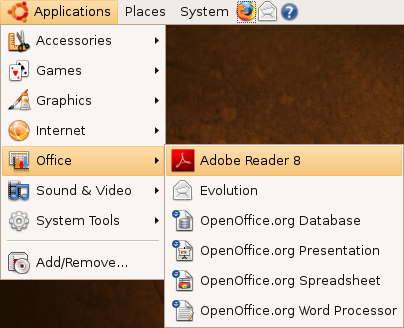
If you want to open acrobat reader go to Applications -> Office -> Adobe Reader
Once it opens you should see similar to the following screen here you need to click on accept the license

Once it opens you should see similar to the following screen

Acrobat reader Version Details

Sponsored Link
Hi, this method does not work well with amd64. Adobe complains of missing libgtkembedmoz. Have to install the 23 libraries for that too. Anyway evince is a native and wonderful alternative.
Problem solved! I think. I searched for libgtkembedmoz.so in my files and found it at /usr/lib/firefox. I opened Adobe Reader to Edit => Preferences => Internet and specified /usr/lib/firefox for libgtkembedmoz.so source.
Are you able to print using Acrobat 8?
I keep getting a “foomatic-rip failed, error status 3” error, and it does not print.
Printing system with cups and hp print doesnt work with acrobat 8…
I can’t seem to access http://www.medibuntu.org. Has this changed or is it temporarily down ?
Thanks for this howto
Please provide a printable version of your instructions on this site.
Thanks
David
Thanks
I cannot get out of my adobe reader8 update install. It remains open and will not close when I press exit. It just sits there in my dock. Mac OS 10.4.11
^ Dawn: This guide has NOTHING to do with Mac OS X. How is Babby formed?
– intrepid solution
sudo wget http://www.medibuntu.org/sources.list.d/intrepid.list –output-document=/etc/apt/sources.list.d/medibuntu.list
sudo apt-get update && sudo apt-get install medibuntu-keyring && sudo apt-get update