
Avast Antivirus for Ubuntu Desktop
Posted by admin on January 31st, 2007
Email This Post
Install Avast Antivirus in Ubuntu
First you need to download the .deb package from here
wget http://files.avast.com/files/linux/avast4workstation_1.0.6-2_i386.deb
Now you have avast4workstation_1.0.6-2_i386.deb package.Install .deb package using the following command
sudo dpkg -i avast4workstation_1.0.6-2_i386.deb
This will complete the installation now you need to get the registration key for this you need to fill the on-line form available here and they will send registration key to your mail address
Applications Menu Setup
or this you need to run a script from the following location
cd /usr/lib/avast4workstation/share/avast/desktop
sudo ./install-desktop-entries.sh install
This will complete the application menu setup.
If you want to access you need to go to Applications—>Accessories—>avast!Antivirus

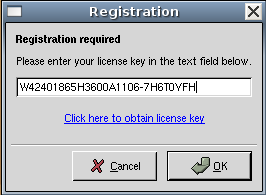
First time it will prompt for license key enter your license key you have got in our previous steps
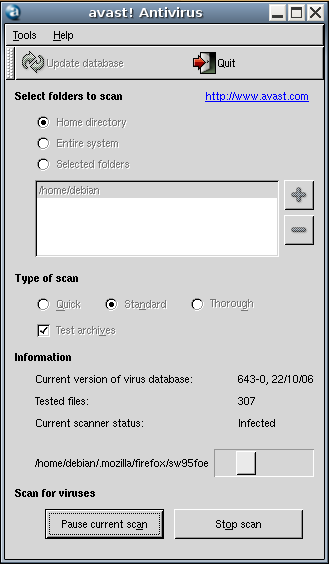
Avast Antivirus Interface

Avast Antivirus database is updating.If you want to update click on update database

You can select the virus scan here and click on start scan
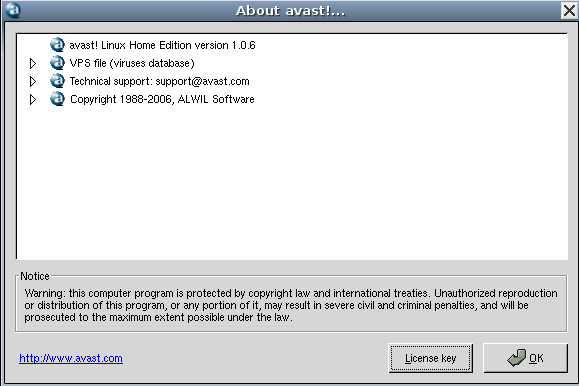
Avast antivirus version details
If you want to be notified the next time we write something please subscribe to our RSS feed.Thanks for Visiting!


February 25th, 2007 at 4:21 pm
Hey,
I am a newbie to Linux and Ubutnu, but I installed it last week with success and haven’t had any issues as of yet (except for random evolution crashes).
But the reason I am posting is that I have followed all of the instruction above, and when I run the Avast application I get the first screen asking for a serial number (which I do have - I registered). After I enter the serial number and click on okay the windows closes and nothing happens.
does anyone have any suggestions?
February 25th, 2007 at 4:49 pm
How would one remove the link to start the application from the Applications -> Accessories menu?
I went to System->Prefrences->Menu Layout and it is not listed there.
February 25th, 2007 at 5:02 pm
I found out how to remove the menu item as well as the application. I still don’t understand why it didn’t work though…
March 4th, 2007 at 10:20 pm
I have the same problem with the registration/serial number.Did you ever solve the thing? Cheers
March 6th, 2007 at 7:42 pm
Thanks for the good howto. This application is the easiest for a newbie like myself. It was the quickest to install and has a nice interface.
I did some digging on how effective AVAST is and it’s up there with the best commercial applications. There are a couple of outfits out there that ckeck antivirus software anually(forgot the name) The one I’m thinking of just failed Microsoft Vista CareOne. What I learned is that Linux virus software detection and cleaning between antivirus programs isn’t the same. Avast was up there w/the best as was AVG. Suprisingly, F-Prot detects but dowsn’t clean, nor did it come w/ a GUI (You had to fiddle with an open source add-on, I couldn’t get to work.) As for CLAMAV, I do not know how effective it is so I’ll stick with this one.
March 18th, 2007 at 5:44 pm
The article isn’t clear what viruses the program is supposed to screen: the thousands of Windows viruses or the dozen or so supposedly Linux viruses? If it’s malware of another type, I think it’s better just to stick to the programs found in the official Ubuntu repositories and to avoid using sudo whenever possible. Subscribing to the Ubuntu or Debian security alerts is also a good idea. Upgrade (or as last measure uninstall) any program that has been flagged as having a security uninstall. Phishing scams, on the other hand, are more of an education issue (”social engineering”), that is, for example, never just mindlessly click on a link.
April 10th, 2007 at 9:17 am
Thanks for all this help.
I’m a new user at Ubuntu and I have got Avast installed but if I will start it get I only a ”Deleted stale lock file ‘/home/christian/.avast/lockfile-christian’.” and all the time the question about my key.
What have I did wrong? What can I do to get it run?
Christian
May 24th, 2007 at 7:37 am
What can i do to install in 64 b machine?
July 3rd, 2007 at 8:15 am
Thanks for all your help. Installation was quick and easy.
Cheers.
August 9th, 2007 at 11:13 am
Thanks! It works great on my Feisy Fawn
August 27th, 2007 at 12:04 am
Thanks! It’s great to know one of my favorite antivirus I use in my Windows machine is available for Linux. Although I’m wondering the same, as to whether it scans for Windows viruses. If yes, wouldn’t that be a waste of resources?
Anyway, this is a great site to learn about Ubuntu stuff. I’m a 2-week-old Ubuntu newbie.
September 27th, 2007 at 3:13 am
Christian,
I have the same problem with the “Deleted stale lock file”. But I have scanned in terminal and it works fine. I suggest you use the following syntax:
First step: avast-update (It does not show the downloading progress in terminal. You need to wait)
Second step: use cd / to select the directory you wish to scan.
Third step: avast -a -c -p3 -r {report file name]
This last step should give you a complete scan in the directory you select. Infected files should be repaired (-p3) and the report file you named should be created in the directory you scanned. Anyway, avast will give you a report in terminal when the job is finished.
Try avast -h for additional scan options.
January 1st, 2008 at 5:23 am
Avast received the coveted virusbtn.com logo for their website in 2003, 2004,2005,2006,2007. They are up for review again in April 2008. Few have.
April 8th, 2008 at 1:58 am
There is no reason the average Ubuntu desktop user needs anti-virus. All it gives is a false sense of security to new users while eating up resources. We should be doing more to educate new users about the reasons its not needed rather than wasting their time installing anti-virus.
April 9th, 2008 at 4:24 pm
The truth is that you do need antivirus. If you have wine installed, a windows virus can hang out there. I picked one off of one of my computers in wine. Also, even though Ubuntu is almost 100% immune to viruses and most windows viruses can’t affect the operating system in a negative way, we need to remember that it’s possible to send our window’s friends viruses and not even know it because most viruses wouldn’t affect our systems.
Here is some good reading on the subject…
https://help.ubuntu.com/community/Linuxvirus
April 23rd, 2008 at 10:18 pm
When I run the
sudo dpkg -i avast4workstation_1.0.8-2_i386.deb
in my ubuntu 7.10
I got an error:
unexpected end of file.
July 5th, 2008 at 10:09 am
i,m not sure if i got screwed with avast ,ipaid 50.007-4-08 for an antiviros for my laptop , and now i dont know if i have it or not , ihave no icons on my computer to log on to avast,and now , cyberdefender keeps bothering me on my computer it is now saying that my pc is infected i dont know what to do ! how do i know if i have avast or not.
August 8th, 2008 at 6:07 pm
I have Avast. I will use it to scan my flashdrive, there are two reasons that I will use it.
Firstly, I have XP installed with no internet access. This makes it kind of safe as long as I don’t infect it myself. I use it for a few excellent reasons. Firstly linux DOES NOT come with everything I need. For adjusting 300 digital pictures from my camera, I use ACDSee Pro 2 (by far the best ACDSee, not a hogger, and with incredibly easy to use advanced lighting adjustments - to do the job in photoshop would take you more than 15 minutes per picture, and I can do maybe 15 seconds per picture on average. Yahoo don’t write a good messenger, and pidgin won’t work properly with webcams or file transfers. It won’t run in Wine, but it will run in virtualbox installed XP.
It isn’t my job to protect MS users, but as a linux user it would be extremely embarrasing to be caught out infecting a work computer. I laugh at people at work (recently zipping files onto my flashdrive, I took a screen shot. Booting Vista, unzip to desktop in 14 minutes. Boot XP and unzip takes only 4 minutes, then boot Ubuntu and do the same in something like 5 to 7 seconds - I missed it, sorry!)
ON DEMAND scanners are what we want aren’t they? no background services, autostart programs or other crap. I have to confess to having Screenlets starting up a nice clock and desktop calendar - but that might not last long. Hopefully the majority will continue to go for KDE, and leave me safer and more secure with my rather weird gnome desktop, and windows with no buttons. My menu is on the side, and I will keep it there. As my abilities continue to improve, I will continually mess up my system so that it works for me and is easy for me to use, and hopefully not anything like everyone else’s system.
All I really want now is a one click method to make a complete backup image of my installation which I can install by opening from the liveCD. This is Vista, and should be next on Ubuntu’s wish list. Stop bashing windows, coz there’s a lot that’s amazing in there. Just the basic system that’s not so cool, and that’s largely the fault of the people that don’t like to move the menu from the bottom left to the top left of the screen…
September 4th, 2008 at 12:48 am
Great How To, easy install considering I am an ex Windows, now Mac + Linux user. I installed Unbuntu today and played around with it and amazed at its speed, and the interface plus your instructions just make me think I made the right decision to switch. Thanks