

Sponsored Link
iptables is already a very powerful tool by itself, but it's syntax can get awkward at times and hard to figure out, so Ubuntu developers decided to make ufw ("The reason ufw was developed is that we wanted to create a server-level firewalling utility that was a little bit more for `human beings`."), which was to be simpler. Now, on the graphical side of things, Firestarer already existed. But why not make an even easier to use GUI for desktop `human beings`, powered by ufw? This is where Gufw comes in.
Install Gufw in Ubuntu
For ubuntu 8.10,9.04,9.10 users use the following command
sudo apt-get install gufw
For Ubuntu 8.04 users download .deb file from here
Install .deb package using the following command
sudo dpkg -i gufw_0.20.7-all.deb
This will complete the installation.
Using Gufw
If you want to open Gufw go to Applications--->Internet--->Gufw Firewall Configuration
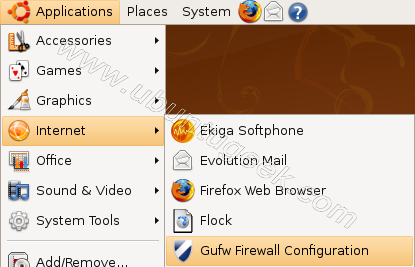
Once it opens you should see similar to the following screen here you need to click on checkbox next to firewall enabled

If you use allow all incoming traffic you should see similar to the following screen

If you select Deny incoming traffic with simple configuration screen

You can see some preconfigured ports options

Some examples configured

Gufw version details

I find the gui in different place, on system menu, on Hardy.
Thanks for the entry 😉
We release new version (0.20.0). It’s in the Administration menu, in the repositoy of Intrepid and important improvement 😉
Best regards.
In this time I haven’t got more time to study features and setting for this nice gui, but It will be good GUI use ubuntu for desktop, but there is a question:
In my desk, there is no servers, so I want to enables only established connections to allow incomeing, there is a way to use this setting, with guwf?
Thank’s for the answer.
Can i use this tool to setup a network firewall (not a desktop firewall)???
@Edson
This service is intended to use for desktop for GUI or ufw for Server
I still like Firestarter better than gufw. Why? Well, in my view, Firestarter produces BETTER iptable rules than does ufw or gufw.
But there is still a lot of room for someone to develeop a TRULY uncomplicated GUI iptable Firewall program. Unfortunately, neither gufw or Firestarter are it.
Please someone look at the Mac OS X Firewall GUI in Tiger (not Leopard). It is VERY easy for most newbies to figure out. There is no reason why the same GUI could not be developed for Linux iptables (or ufw).
wish this was part of “apt-get install gufw”, but aside from that, glad to see progress being made on this.
Some pre-configured rules should be done for mysql (3306) and also for http (80), https, samba, and various other common developer ports.
Good start though!
Firestater is bi-directional(meaning controls both incoming and outgoing traffic.) I do not believe ufw is.
@Jj
Gufw and Firestarter are both frontends to ufw. So incoming and outgoing traffic can be configured with both.
I just installed Ubuntu. I use UFW and GUFW. When I set GUFW on Deny all incoming traffic I still can use all internet activities. When I use Windows Vista and set my firewall on blocked all traffic I do not have internet access. Question: What do I wrong with GUFW?
its simple, with gufw u deny all incoming conections to your computer, not your outgoing conections. with vista u block all trafic
Hi,
I would like to know how to block region specific traffic using open source firewall. I use gufw, which has a function under “File” – “+Banning IP Address” but it demands some kind of IP address format that I do not understand.
I get a lot of spam and I would like to kill all that crap at the earliest.
Peace,
David Shar
hey UG, just wanted to thank you for this ..
thought you’d like to know I gave it a well-deserved mention in my Karmic security overview, as part of my recent Karmic Installation Bible:-
HACK-PROOF 9.10 Anti-Virus & Firewall [KARMIC KOALA BIBLE #19]
and which in turn has been published as a pdf by my partner for this guide, MakeUseOf.com:-
The Incredible Guide to NEW Ubuntu (Karmic Koala) [PDF]
.. er, it’s on Scribd too!
Cheers UG, as I mention, you are always very good value, and this write-up is no exception. Appreciate very much the benefit of your experience.
I have tried to use pulse audio. The only way I can use skype and run my wine games is with esound. Why isn’t Esound just offered as an easy option since pulsequdio is obviously a WIP? Also why are so many people in denial about Pulse Audio? It breaks too many things that are not broken by anything else.they must have their heads stuck in the sand not to know this. I even have a linux native game that will not exit when pulseaudioo is used.
Getting my home lan with Samba and any firewall is difficult. If I disable the firewall I can mount the files from my No 2 Mint onto my No 1 Ubuntu 10.4. After that I can enable the firewall and play with the files. I’m not able to m.ount the files from No 2 onto No 1 with the firewall enabled.
On gufw I have
137/udp allow in anywhere
138/udp allow in anywhere
139/tcp allow in anywhere
445/tcp allow in anywhere
What am I doing wrong? Regards Ian.
@stanley82\Ian – my commant may be a bit late, but you also need TCP port 135 open for Samba.
Thanks, I’ve added 135 and it’s not made any difference. I still have to disable the firewall and once the “my files” on the other machines are mounted on my desktop I can re-enable the firewall and work with the already mounted “my files”. I’m missing something and it’s a silly I’m sure. I’ve moved up to Mint 11 by the way. Regards Ian.
stan@Ian ~ $ sudo ufw status verbose
[sudo] password for stan:
Status: active
Logging: on (low)
Default: deny (incoming), allow (outgoing)
New profiles: skip
To Action From
— —— —-
80/tcp ALLOW IN Anywhere
22 ALLOW IN Anywhere
443 ALLOW IN Anywhere
4662 ALLOW IN Anywhere
137,138/udp (Samba) ALLOW IN Anywhere
139,445/tcp (Samba) ALLOW IN Anywhere
135/tcp ALLOW IN Anywhere