

Sponsored Link
Install C and C++ Compilers in Ubuntu
sudo aptitude install build-essential
This will install all the required packages for C and C++ compilers
Testing C and C++ Programs
Compiling Your first C Programs
Now you need to open first.c file
sudo gedit first.c
add the following lines save and exit the file

Firstly compile the code using the following command
cc -c first.c
that would produce an object file you may need to add to the library.
then create an executable using the following command
cc -o first first.c
Now run this executable using the following command
./first
Output should show as follows
Hello, world
Compiling your first C++ program
If you want to run c++ program follow this procedure
g++ is the compiler that you must use.
you should use a .cpp file extension rather than a .c one
You need to create a file
sudo gedit first.cpp
add the following lines save and exit the file
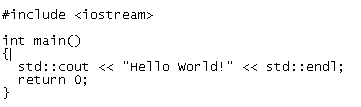
Run your C++ Program using the following command
g++ first.cpp -o test
./test
Output should show as follows
Hello World!
thanks…. I’ve solved my problem…
This is all nice and everything, it’s definitely helped me out, but for some reason, when I attempt to compile a code that has ‘=’ in it, I get:
doc1.cpp:1: error: expected constructor, destructor, or type conversion before ‘=’ token
doc1.cpp:2: error: expected constructor, destructor, or type conversion before ‘==’ token
doc1.cpp:3: error: expected constructor, destructor, or type conversion before ‘==’ token
what have I done wrong?
It could be anything. Next time you ask for help, Jer, be sure to give us more information. and by more information, I mean post the code, or the snippet, because simply saying “= error” doesn’t help us to help you.
you get the ‘=’ problem if you forget the ‘#’ before inlcude
thanks !
it work
The question is not how to install the compiler, but rather where are the libraries and the descriptions of functions and classes, ect. that are available.
What about math.h, stdio.h, etc? where are they located, and where are they documented?
i’ve got an error msg after typing
cc -c first.c
The program ‘cc’ can be found in the following packages:
* gcc
* pentium-builder
* tcc
* tendra
Try: sudo apt-get install
Gauruav, you didn’t install g++? Why not? Install g++, THEN run the “g++ /home/[name]/first.cpp -o first”
I cant access internet using ubuntu OS.Only in Windows.
So how can i download the C-package using windows and then install??
And also how can v connect a ubuntu user with a windows user using wifi?
i installed both gcc and g++,
gcc is working fine but when running c++ program like
g++ first.cpp
The program ‘g++’ can be found in the following packages:
* g++
* pentium-builder
Try: sudo apt-get install
g++: command not found
help plz
plz tell me how can i install this particular software because i want to do prgrms in my own system , have great intrest to invent a new software and i have the idea also i knew how to write the prgrm also but evry time showing errors
thanks 🙂
i didn’t forget the “#” before include, but I get the same errors as JER… 🙁
after writing
g++ sum.cpp -o out
error:
sum.cpp:1:21: error: iostream.h: No such file or directory
sum.cpp:2:18: error: conio.h: No such file or directory
sum.cpp: In function ‘int main()’:
sum.cpp:8: error: ‘cout’ was not declared in this scope
sum.cpp:9: error: ‘cin’ was not declared in this scope
At the top of the file: “include “; Your file is C++, not C. There is no need for “iostream.h”. Also, you need to declare “conio.h” at the top of the file. As for “cout” and “cin” functions, after you declare your preprocessors, insert this “using namespace std;”. I have already explained to you guys how this is done, since the author of this article failed to include standard libraries.
How to install c++ compiler?
while installing from synaptic packages are asking for dependencies which is confusing.
plz tell me right way of installation (command line/ graphical)
Thankx
PLZZZZZZZZZZZ HELP – BIG TROUBLE FOR EVERY INSTALLATION:
Errors were encountered while processing:
crossplatformui
Plz tell me how to run graphics programs using c in ubuntu
hi
i have wrote a program
#include
#include
{
clrscr();
printf(“hello”);
getch();
}
i have saved with hello.c
when i complied with
cc -c hello.h
it has got fatal error:conio.h:no such file or directory compliation terminated
what i should do
(srikanth)
their is no need of clrscr and getch in c.
first you have to make file by “vi hello.c”
then enter program
header file=stdio.h
#include
int main()
{
printf(“hello”);
}
then press Esc and enter :wq
then to compile gcc -o out hello.c
out-it is the output file
you can give any name of output file
to run ./out
hello. im sorta new to ubuntu and also to c++ but i am experianced with Python. pardon my spelling errors but when i had the sperator bar right under neith main() and it said it expected something before it. once i removed it, the program ran smoothly but there was no output. any suggestions?
Thank, buddy:)
Keep up the good work.
Can u tell me how to go to the path C:/dev-C/Include in ubuntu.
I need to paste some .h files there.
After
cc -c first.c
I got:
Assembler messages:
Fatal error: can’t create first.o: Permission denied
Why Permission denied?
OK, I got it.
If you’re getting “permission denied” which generally means that you need to do things as “root” thus, you should use the special magic command. “sudo”.
so it should be:
sudo cc -c first.c
and so on…
Then you get:
Hello World!
Hey am trying to install C++ compiler, first of all typing sudo aptitude install build-essential and i get this message.
i need help.
thanks
Reading package lists… Done
Building dependency tree
Reading state information… Done
Reading extended state information
Initializing package states… Done
No packages will be installed, upgraded, or removed.
0 packages upgraded, 0 newly installed, 0 to remove and 0 not upgraded.
Need to get 0B of archives. After unpacking 0B will be used.
Writing extended state information… Done
Reading package lists… Done
Building dependency tree
Reading state information… Done
Reading extended state information
Initializing package states… Done
Great instructions. just the job, worked first time. Happy new c++ programmer! 😀
To Adia,
TRY THIS
sudo apt-get install build-essential
THEN IT WILL ASK FOR PASSWORD. PROVIDE YOUR PASSWORD. TOU WILL RECEIVE THIS:
Reading package lists… Done
Building dependency tree
Reading state information… Done
The following extra packages will be installed:
dpkg-dev fakeroot g++ g++-4.4 libalgorithm-diff-perl libalgorithm-merge-perl
libdpkg-perl libstdc++6-4.4-dev patch
Suggested packages:
debian-keyring g++-multilib g++-4.4-multilib gcc-4.4-doc libstdc++6-4.4-dbg
libstdc++6-4.4-doc diffutils-doc
The following NEW packages will be installed:
build-essential dpkg-dev fakeroot g++ g++-4.4 libalgorithm-diff-perl
libalgorithm-merge-perl libdpkg-perl libstdc++6-4.4-dev patch
0 upgraded, 10 newly installed, 0 to remove and 48 not upgraded.
Need to get 8,318kB of archives.
After this operation, 25.0MB of additional disk space will be used.
Do you want to continue [Y/n]?
PRESS Y AND THEN PRESS ENTER
HOPE IT WILL WORK (ACCORDING TO UBUNTU 10.10)
thanx ubuntu forums …for good suggestions
It has helped me incase of c but not in the case of c++ this there is change in program. It must be modified as follows
std::cout <<"Hello world"; only
The above line must be replaced and executed in case of ubuntu 10.10