

Sponsored Link
First you need to download vmware server 2.0.x from vmware website and get the vmware server installation key
Currently we have a problems compiling vmware server under kernel version 2.6.31 so this tutorial will explain how to install vmware server 2.0.x in Ubuntu 9.10
Now we have VMware-server-2.0.2-203138.i386.tar.gz file so unpack this file
tar -zvxf VMware-server-2.0.2-203138.i386.tar.gz
go to vmware-server-distrib directory
cd vmware-server-distrib
Run vmware-install.pl script using the following command
./vmware-install.pl
Now you might receive compilation error messages so now you need to download required patch files from here in vmware-server-distrib directory these patches from vmware forum
You can use the following command to download patches
wget http://www.ubuntugeek.com/images/vmware-server.2.0.1_x64-modules-2.6.30.4-fix.tgz
After downloading extract vmware-server.2.0.1_x64-modules-2.6.30.4-fix.tgz file
tar xvzf vmware-server.2.0.1_x64-modules-2.6.30.4-fix.tgz
Now run the patch script using the following command
sh vmware-server.2.0.1_x64-modules-2.6.30.4-fix.sh
Note:- This script will work 2.6.30,2.6.31 kernel versions
After each completing the patch installation you should see similar to the following message

After completing the patch installation you need to remove /usr/lib/vmware/modules/binary directory because The original VMware modules directory is still in the way so this will confuses VMware that is why we are removing this directory
rm -rf /usr/lib/vmware/modules/binary
Now run vmware-config.pl script
vmware-config.pl
This should complete the vmware server installation.

Now open your browser type https://PC-ipaddress:8333 once it opens you should see similar to the following screen
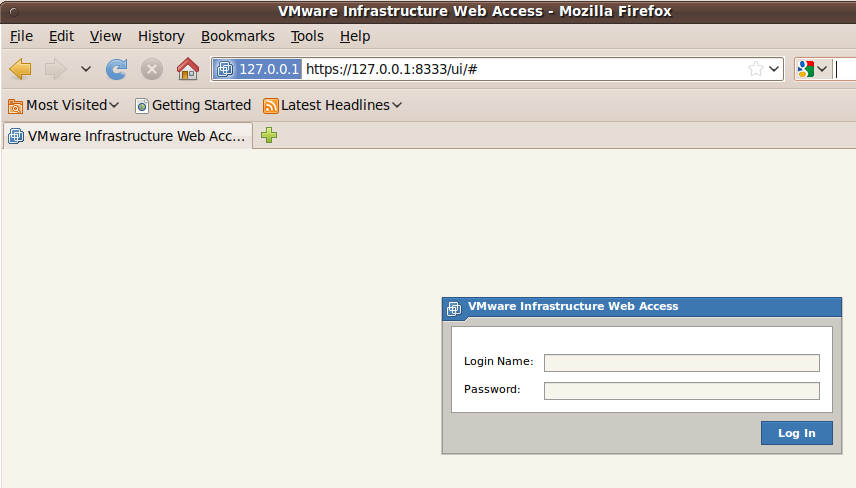
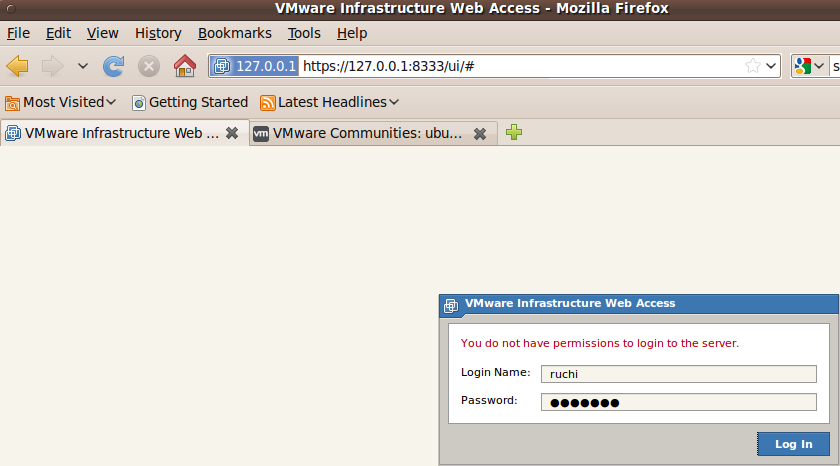
Whe you try to login using your ubuntu user login details you might see "You do not have permissions to login to the server" error this is because you need to enable root account on your ubuntu machine using this tutorial or login as user who is having root permissions
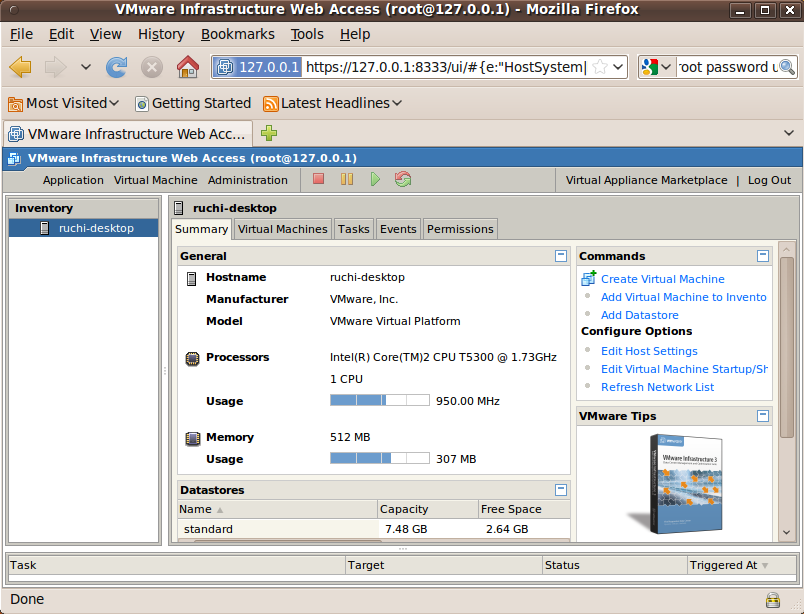
Once you login you should see similar to the following screen
Reinstall Vmware server
If you still having problems with your vmware server installation follow these steps
Delete the vmware modules using the following command
rm -rf /usr/lib/vmware/modules/
rm -rf /lib/modules/2.6.31-13-server/misc/vm*
Now kill all vmware processes manually
kill -9 $( ps -ef | awk ‘/vm/ { print $2 }' )
Now run vmware-install.pl file
./vmware-install.pl
at the time of installation where you see the following message type no and press enter
Before running VMware Server for the first time, you need to configure it by
invoking the following command: "/usr/bin/vmware-config.pl". Do you want this
program to invoke the command for you now? [yes] no
Now you need to run the patch script file using the following command
sh vmware-server.2.0.1_x64-modules-2.6.30.4-fix.sh
After completing this you should run vmware-config.pl
/usr/bin/vmware-config.pl
Error message
When i try to install vmware server 2.0.2 under ubuntu 9.10 i got the following error so i installed the patch file with the procedure specified above
/tmp/vmware-config0/vmmon-only/linux/driver.c:2007: error: too many arguments to function ‘smp_call_function’
make[2]: *** [/tmp/vmware-config0/vmmon-only/linux/driver.o] Error 1
make[1]: *** [_module_/tmp/vmware-config0/vmmon-only] Error 2
make[1]: Leaving directory `/usr/src/linux-headers-2.6.31-14-generic'
make: *** [vmmon.ko] Error 2
make: Leaving directory `/tmp/vmware-config0/vmmon-only'
Unable to build the vmmon module.
For more information on how to troubleshoot module-related problems, please
visit our Web site at "http://www.vmware.com/go/unsup-linux-products" and
"http://www.vmware.com/go/unsup-linux-tools".
Execution aborted.
If one starts vmware-install a second time and states “no” to the question to start vmware-config the the vmware user and the serial number settings will be installed correctly and the pitfall with the logon will disappear.
my 2 cent’s – ubuntu admin
I Installed vmware by this manual from other site… actually its works but….. there are some problems i found:
vmware hangs when i trying to bind my cellular modem x950 novatel.. in 9.04 it was working whithout problems
there is some bug with display manager. not all area of vm guest installed on vm is available for mouse events. so you can work clear from console.
just from RDP connection if possable
you still have to gedit /etc/fstab file for bind USB devices by adding next rows:
usbfs /proc/bus/usb usbfs auto 0 0
none /proc/bus/usb usbfs devgid=46,devmode=664 0 0
Or just ignore this awful piece of SW and install the wonderful VirtualBox: http://www.virtualbox.org/
Thanks. Once again I got great support from ubuntu community! 🙂
Thanks for your guide.
VM Server will now compile properly.
I’m experiencing, though, problem with mouse pointer in virtual Windows XP. It is switching between the regular pointer and “hand with indexfinger pointed” – making mouse controlls in the virtual appliance totally useless – I can’t controll the desktop. On the other hand, desktopless virtual Linux-server installations work as charm as mouse is not needed.
Try one of the solutions for mouse problem
Solution 1
Added these lines to my /usr/bin/firefox
export VMWARE_USE_SHIPPED_GTK=force
export GDK_NATIVE_WINDOWS=true
Solution 2
Go into
/home/username/.mozilla/firefox/df34789dfgj/extensions/[email protected]/plugins/lib
Then edit the file:
wrapper-gtk24.sh
I added the following lines near the top:
VMWARE_USE_SHIPPED_GTK=’force’
export VMWARE_USE_SHIPPED_GTK=”force”
So now the mouse appears to work correctly.
Solution 3
create this file using the bin/bash text.
give it a name like VMlaunch.sh
make it executable
run it and it loads the VMware machine
#!/bin/bash################################################## ##############################
# Call VMWare Server's Remote Console in a clean GTK setup.
################################################## ##############################
# Clean GTK setup for VMWare
export VMWARE_USE_SHIPPED_GTK=yes
# Find console executable in Firefox plugins.
vmrc="$(find "$HOME/.mozilla/firefox" -name vmware-vmrc -type f -perm -111 | tail -1)"
[ -x "$vmrc" ] || exit 1
set -x
cd "$(dirname "$vmrc")" && "$vmrc" -h 127.0.0.1:8333
Just a linux newby comment, for the patch to be applied, you’ll need the build-essential module installed.
Use ‘sudo apt-get install build-essential’ before applying the patch.
Thank you – this worked perfectly. I was upgrading to Karmic from Jaunty on a 64 bit system.
I agree, when asked, select to use a admin username of your own choice:
The current administrative user for VMware Server is ”. Would you like to
specify a different administrator? [no] yes
Please specify the user whom you wish to be the VMware Server administrator
… and then select your own username
Thanks for the help but i REALLY want to do a VMWARE SERVER 1.X install on 9.10.
Got anything on that?
Solution 1 and 2 do not work for me to fix the foucs trouble.
I really had it with this, I agree with the go for Virtual Box.
Thanks anyway.
Thanks so much for this, really helpful. I’m a ‘nix n00b but very familiar with VMWare solutions, I just wanted to eke a bit more performance out of a home setup. Your instructions worked like a charm.
How to install Ubuntu 9.10 in Net worked system
12.
How to install Ubuntu 9.10 in Net worked system, printer function, sharing etc with the help of screen shots
Vincent, I tried 2nd solution and it worked. You just need to change quotation from those unicode thing, to normal double quotation mark.
I needed the “build Essentials” before the patches worked.
Then I still go errors re the vnnet module, however the process did complete, altho I suspect I may have network issues later.
Presumabley at some point VMware will release a version which will run nativley on kernel 2.6.3x
Tks for the guide
Firefox can’t find the server at pc-ipaddress.
Solved: http://localhost:8222
Anyone got the script pre-built as in solution 3?
I thought I was OK know a bit of Linux term etc. but building with bash, even google struggled to explain that. Just kept giving me sie that say “build with /bin/bash” yeap that helps.
Make executable? again googles gave me loads of sites that repeats the instruction but none that really helped.
Guessing it is truly easy and simple and most people just guess you could not know about it so they leave it out of the instructions.
So for a know proven total noob it is not as simple as just saying it.
A pre build or a link to a site that tells us how would really help.
Thanks
This has worked fine, (Ubuntu 9.10/2.6.31-14/VMware server 2.0.1) but now I’m having trouble with my (USB) keyboard.
When using a (Windows XP) VM the arrow keys don’t work, except the down arrow key which appears to be mapped to the Windows key.
To fix the keyboard mapping issue add the following line to either ~/.vmware/config (for an individual) or to /etc/vmware/config (for all users):
xkeymap.nokeycodeMap = “true”
For more details read http://www.jaredlog.com/?p=925
Thanks a lot 🙂
Hi. thx for tut, works perfectly with:
– Ubuntu 9.10
– VMware-server-2.0.2-203138.x86_64
– Kernel 2.6.31-16-server x86_64
best regards,
Kevin.
I am missing something, I caught the error when I tried the to install and it couldn’t build. When I run the patch I have this output:
Found tar file for vmci module
Found tar file for vmmon module
Found tar file for vsock-temp module
Found tar file for vmmon-temp module
Found tar file for vsock module
Found tar file for vmnet-temp module
Found tar file for vmnet module
Found tar file for vmci-temp module
Using patch file: /usr/lib/vmware/modules/vmware-server.2.0.1_x64-modules-2.6.30
-fix.patch
Using module directory: /usr/lib/vmware/modules/source
Using backup directory: /usr/lib/vmware/modules/source-backup
Backing up ./vmci.tar to /usr/lib/vmware/modules/source-backup/./vmci.tar
Backing up ./vmmon.tar to /usr/lib/vmware/modules/source-backup/./vmmon.tar
Backing up ./vsock-temp.tar to /usr/lib/vmware/modules/source-backup/./vsock-tem
p.tar
Backing up ./vmmon-temp.tar to /usr/lib/vmware/modules/source-backup/./vmmon-tem
p.tar
Backing up ./vsock.tar to /usr/lib/vmware/modules/source-backup/./vsock.tar
Backing up ./vmnet-temp.tar to /usr/lib/vmware/modules/source-backup/./vmnet-tem
p.tar
Backing up ./vmnet.tar to /usr/lib/vmware/modules/source-backup/./vmnet.tar
Backing up ./vmci-temp.tar to /usr/lib/vmware/modules/source-backup/./vmci-temp.
tar
Untarring vmci.tar
Untarring vmmon.tar
Untarring vsock-temp.tar
Sorry, vsock-temp.tar tarball failed to extract the directory vsock-temp-only
Any thoughts?
Ubuntu newbie.
– Ubuntu Server 9.10 64b
– VMware-server-2.0.2-203138.x86_64
– Kernel 2.6.31-16-server x86_64
I installed vmware on 9.10. Major problems, mouse downt work well at all, keyboard gets mucked up (shitft doesnt work ) xp vm will crash Vmware server when i power it down….
enough!!!!
Im going back to virtualbox.
I use ubuntu b/c it just works , thats why im switching abck to virtualbox. I wanted to elarn vmware but not that badly. I dont ahve time to muck with it.
chuff,
does virtualbox on 2.6.31 work for you..
it doesn’t for me. I get a command not found if I try to run /etc/init.d/vboxdrv ..
I posted on virtualbox site..so far no one as offerend a solution..
-davekenny
Thanks ADMIN!!!!
I really needed the fix and used the 1st one. Awesome.
After installing this on kubuntu 9:10 i get a ‘web service not available. the web service appears to be running and i check the ip which is listed in /etc/vmware/config.which i can ping. not sure but i believe there is a problem running this with apache on the same server. What a shame, stick to virtualbox. you may have to run
sudo apt-get install build-essential
before installing virtualbox
The patch failed on my system when running the patch:
Found tar file for vmnet module
Found tar file for vmblock module
Found tar file for vsock module
Found tar file for vmci module
Found tar file for vmmon module
Using patch file: /home/me/download/vmware.patch/vmware-server.2.0.1_x64-modules-2.6.30.4-fix.patch
Using module directory: /usr/lib/vmware/modules/source
Using backup directory: /usr/lib/vmware/modules/source-backup
Untarring vmnet.tar
Untarring vmblock.tar
Untarring vsock.tar
Untarring vmci.tar
Untarring vmmon.tar
Testing patch
patching file vmci-only/Makefile
patching file vmmon-only/linux/driver.c
Hunk #1 succeeded at 1758 (offset -226 lines).
patching file vmmon-only/linux/hostif.c
Hunk #1 succeeded at 3437 with fuzz 2 (offset 15 lines).
Hunk #2 FAILED at 3551.
Hunk #3 FAILED at 3675.
2 out of 3 hunks FAILED — saving rejects to file vmmon-only/linux/hostif.c.rej
patching file vmmon-only/include/x86svm.h
Hunk #1 FAILED at 47.
1 out of 1 hunk FAILED — saving rejects to file vmmon-only/include/x86svm.h.rej
patching file vmmon-only/Makefile
Hunk #1 succeeded at 139 with fuzz 1 (offset 26 lines).
patching file vmnet-only/Makefile
Hunk #1 succeeded at 139 with fuzz 1 (offset 26 lines).
patching file vmnet-only/netif.c
Hunk #1 succeeded at 180 (offset -14 lines).
Hunk #2 succeeded at 206 (offset -14 lines).
Hunk #3 succeeded at 310 (offset -14 lines).
Hunk #4 succeeded at 556 (offset -14 lines).
Hunk #5 succeeded at 612 (offset -14 lines).
Hunk #6 succeeded at 673 (offset -14 lines).
patching file vsock-only/Makefile
Sorry, problem with the patch, I can’t apply it
My system is 2.6.31-16-generic x86_64.
Googled but nothing interesting.
Thank you for this very good post!
Thanks !!! very helpful, worked with 2.6.31-16, 2.0.1