

Sponsored Link
Key features
- Email, contacts, calendar, and documents all in one application
- Syncs Zimbra, Yahoo! Mail and Gmail email, contacts and calendars
- Read email from any POP or IMAP email account including AOL, Hotmail or business email
- Works on Windows, Mac, or Linux desktop computers
- No limit to the size of your email storage
- It works online and offline
- Available in 20 languages
Install Zimbra Desktop on Ubuntu
1.First you need to download Linux package from here www.zimbra.com/products/desktop.html
2. Extract the content of the package (*.tar.gz) on your Home, Desktop...right click > Extract here
3. Open a terminal and go where you extract zimbra...for example:
$ cd home//Desktop/zdesktop_2_0_1_b10659_linux_i686/
4. from that path run:
$ sudo ./install.pl
5. It will guide you to the Setup Zimbra Desktop > press (A) to accept terms and conditions
6. If you would, accept the default directori where it install
/opt/zimbra/zdesktop
7. Would you like to continue to install files for user: Root? > Here you may want to answer NO...otherwise you always have to log in Zimbra Desktop as superuser.
8. To install data files run this command (always on the same path: ~//Desktop/zdesktop_2_0_1_b10659_linux_i686/):
$ /opt/zimbra/zdesktop//linux/user-install.pl
9. Now you'll be asked about where to install files, for example:
Home//.zdesktop
(if you put a dot in front zdesktop, it'll be hidden (ctrl+h) inside your home folder...)
10. And then you'll be asked about the path where to locate the icon where you'll launch Zimbra, for example:
/home//Desktop
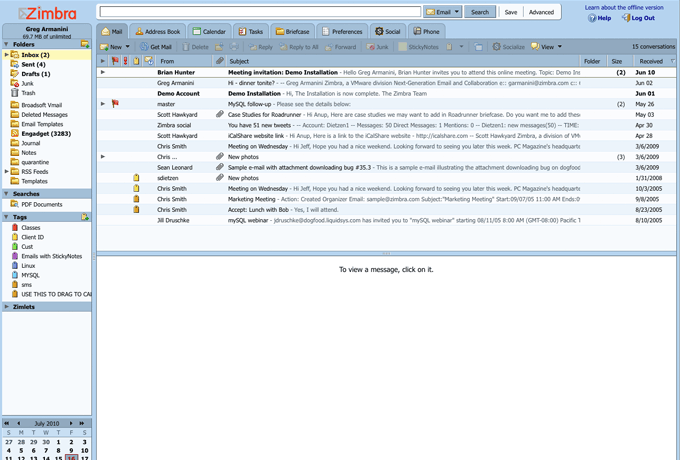
11. Press enter and configure your accounts. It is a really usefull, and complete aplication. You have tabs to manage facebook,twitter accounts, calendar, tags...
Via Ubuntu forums (Credit goes to the author)
Screenshot
Unfortunately no support for 64 bit systems.
Humm… I have just finish installing it on a 64 bit system… and it works
This really works! Thanks a lot. I installed Zimbra on Ubuntu 11.10
Worked like a charm – Zimbra 7.1.4 on Ubuntu 12.04. Thanks a bunch, geek !