

Sponsored Link
To launch Synaptic, choose System > Administration > Synaptic Package Manager
Now you need to select Settings -> Repositories.

Select Ubuntu Software tab In the Download From drop down, choose Other...

Click the Select Best Server button in the resulting dialog.Wait a minute (or perhaps more on a slow connection).

Testing best server is in progress

Once it's finished,click on choose server
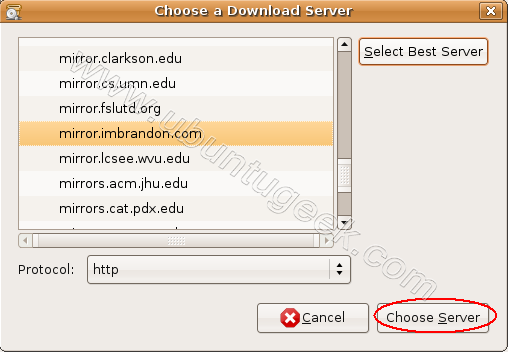
close everything and click Reload in the main Synaptic window.

Downloading package information in progress from your new mirror
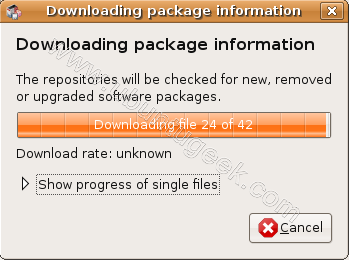
This simple procedure picks the best mirror for you. This works for me very well so i would suggest you try this and see if it works for you or not.
If you have any other method which worked for you please let us know.
Thanks for this, really great, i have three hardy ubuntu boxes in our house, this helps.
Sometimes the fastest server won’t work. After you select it and refresh the repos, it gives you an error. If this happens, start synaptic from a terminal (sudo synaptic) and do the test again. This will actually show you the fastest few repos, and you can try the next fastest!
Also just take a look in the list and see if you recognize any of the servers. I’ve run the find best server and it doesn’t always come up with the server that I can get the best bandwith from. I’ve had it put me on a server in Spain before and I live in Oregon. Thankfully there is a server about an hour drive from here that gives me 1.5 megabyte a second download rates! 🙂
So just make sure and take a look and don’t just “trust” the ping based method.
Nice Post. Did not know about this functionality in Ubuntu
Is there a way to select the second or third fastest mirror, as for me the fastest mirror sometimes does not work (sometimes it produces checksum failures, sometimes it seems not to be available…)? Any input would be appreciated
I just have updates download in the background and use the main server for installing new stuff (since it has less downtime than mirrors in my experience).
Using a local server doesn’t always work.
I was wondering why the estimate for downloading kde had dropped to 8 hours on my usual 5-6 meg connection from the uk canonical repository.
I chose the select best server method and 45 minutes later I had it downladed & installed.
I wonder if there is a similar way to do this from the command line. Or I have to manually edit the /etc/apt/source.list?
Thanks for leaving simple instructions! Everything else I have looked up has not been “end-user” friendly. Please keep it up!
im using kubuntu hardy and my synaptic looks nothing like this, the only one that looks like the version of synaptic that i have in kde 3.5.9 is the first picture. these options must not exist in mine 🙁
superb…..it helped me a lot
thanks for your wonderful tip it was great, working much faster then the default one..
Hi,
i am using Ubuntu 6.06 and there is no “select fastest server” or software tab in Synaptic package manager.
I am trying to download Ubuntu Hardy 8.04 on a 256kbps connection using gwget. I am copying multiple download mirror links from Asia and Europe and downloading them simultaenously as it updates only 1 file, inorder to speed up download.
Is there an alternative in Ubuntu 6.06 to select the fastest server?
Please advice.
Would be nice if you could select the fastest 3 mirrors and have it test before each download and use the fastest for downloads. I am not saying test all servers, just the 3 “preferred” mirrors. Someone should post this suggestion.
For the next fastest server open a terminal and enter “sudo synaptic”. Then >Settings>Repositories . After you run the test you can go back to the terminal that opened Synaptic and you will notice it lists the fastest responding mirrors. Common sense is important here as a good response time for a little ping packet doesn’t mean it has the most bandwidth for packages.
Thanks to Brett Howard & Ryan for your pointers earlier.
Thank you very much! It help me a lot!
no ,it doesn’t help ,it chooses the foreign one which is so slowy
THANK YOU! this helped me out a bunch. I was downloading at a snail pace of less than 1kbs, after this tweak I am downloading at 900-1000 kbs. Thanks again.
Hi,
Thanks for the tip. However, regardless the best server this feature chooses or I choose for trial and error, the download speed drops from anywhere 200Kb/s to 6Kb/s in a few seconds. This problem has been on my PC since ubuntu 6.06 (now 8.10). And I don’t experience this problem using the Windows 2000 partition on the same PC.
Hi
Thanks a lot,but i am bit skeptical that i might miss some of the downloads ,as my default server was showing me different number of packages to be installed.please advice.Thanks in advance.
i just used this fix during my jaunty update today. it definitely did the trick.
thanks so much! was downloading at 50kbs now about 1mbs!
Thanks . Fixed my hardy updates straight away
Holy Wowee!!!!
I been running linux/winblows for years on and off (for both) Latest new install of 9.04 was KILLING me for updates!!!! I dont pay for 8Mb a month internet to get 100B/s updates from LITERALLY across the river….. Your technique found me a server in another COUNTRY which turned that 4 DAY update into 4 minutes….. Rockin and lovin it bro!
Thanks!!!
Thanks a bunch, this seems to have helped greatly 🙂
That is awesome I went from an estimated 1 day and 12 hours to about 30 minutes. That is the best information I’ve got in a long time. You Rock.
From 13kb/s to 913! Thanks a bunch! =)
awesome.. sucha big difference
Thanx!!! Save my day!
Excellent!!! thanks a lot…
Anyway to do this through command line for people with server version without manually editing sources.list?