

Sponsored Link
Tor works with many of your existing applications, including web browsers, instant messaging clients, remote login, and other applications based on the TCP protocol.
Privoxy is a non-caching web proxy with advanced filtering capabilities for enhancing privacy, modifying
web page data, managing HTTP cookies, controlling access, and removing ads, banners, pop-ups and other
obnoxious Internet junk. Privoxy has a flexible configuration and can be customized to suit individual
needs and tastes. Privoxy has application for both stand-alone systems and multi-user networks.
Install Tor and privoxy in Ubuntu
sudo aptitude install tor privoxy
This will complete the installation.
GUI Tools Available for Tor
Currently we have the following TOR GUI Applications
Vidalia
Vidalia is a cross-platform controller GUI for the Tor software, built using the Qt framework. Using Vidalia, you can start and stop the Tor software, view its status at a glance, and monitor bandwidth usage. Vidalia also makes it easy to contribute to the Tor network by helping you set up and manage your own relay.
Torbutton
Torbutton is a 1-click way for Firefox users to enable or disable the browser's use of Tor. It adds a panel to the statusbar that says "Tor Enabled" (in green) or "Tor Disabled" (in red). The user may click on the panel to toggle the status. If the user (or some other extension) changes the proxy settings, the change is automatically reflected in the statusbar.
Some users may prefer a toolbar button instead of a statusbar panel. Such a button is included, and one adds it to the toolbar by right-clicking on the desired toolbar, selecting "Customize...", and then dragging the Torbutton icon onto the toolbar. There is an option in the preferences to hide the statusbar panel (Tools->Extensions, select Torbutton, and click on Preferences).
Newer Firefoxes have the ability to send DNS resolves through the socks proxy, and Torbutton will make use of this feature if it is available in your version of Firefox.
TorK
TorK is a powerful anonymity manager for the KDE Desktop on Linux and Unix systems. It first helps you
to install, configure and use Tor. It then reduces the task of anonymizing most applications to a single-click, including Firefox, Opera, Konqueror, Pidgin, Kopete, SSH, and IRC. For advanced users TorK
provides detailed network information, and more, in an accessible manner.
If you wish to run TorK locally, please install the tor and privoxy packages.
Features include:
* Browse anonymously on Konqueror/Firefox/Opera.
* Send anonymous email via the MixMinion network.
* Use Internet Messaging and IRC anonymously.
* Create and manage hidden services.
Install Vidalia in Ubuntu Gutsy and Hardy
You need to edit the /etc/apt/sources.list file using the following command or Go to System->Preferences->Software Sources and enter these repositories into 3rd Party Repositories and click
on reload.
sudo gedit /etc/apt/sources.list
add the following lines
For Hardy Users
deb http://ppa.launchpad.net/adnarim/ubuntu hardy main
deb-src http://ppa.launchpad.net/adnarim/ubuntu hardy main
For Gutsy Users
deb http://ppa.launchpad.net/adnarim/ubuntu gutsy main
deb-src http://ppa.launchpad.net/adnarim/ubuntu gutsy main
Save and exit the file
Now you need to update the source list using the following command
sudo aptitude update
Install Vidalia using the following command
sudo aptitude install vidalia
this will complete the installation.
Now you need to open Vidalia Go to Applications--->Internet--->Vidalia

After opening you should be able see similar to the following screen.If you want to change the settings click on settings in the following screen
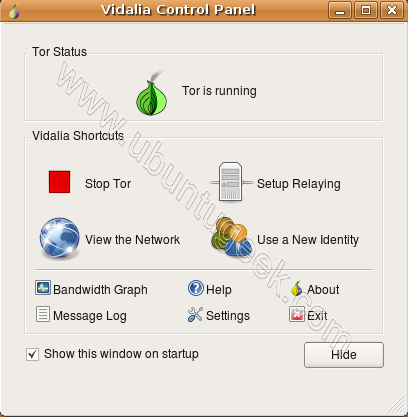
If you want to see Network Map click on View the Network on the above Screen

Tor Bandwidth usage

If Tor is working you can see similar to the following icon marked in Red in your notification area

If you want to configure firefox for browsing check this
Install TorK in Ubuntu
If you want to install TorK use the following command
sudo aptitude install tork
Install Torbutton in Ubuntu
Download Torbutton from here and install for your firefox.
Nice! I like this one! Not sure that I have too many times that I’ll need it but its good to know its there. 🙂
Upon adding the lines to the repos, and updating, I received a pgp error for each line you have to add.
Can this be fixed? Or is it fatal?
Mark,
Install packages after updating. The pgp error is not an impediment to install that the repositories are updated.
I really want to follow your work here. I’m confused though. I had added the line and sudo aptitude update, before I tried to install the packages. That’s when I got the pgp errors. Also, the Tor button for firefox, is that what you are doing here? Sorry. Thanks for the help.
I tried this in Hardy but when I run Vidalia I get a yellow onion and not green, it then doesn’t respond?.
Before reading this I compiled the original source files for vidalia and it did the same thing.
doesn’t work with vidalia comes up with the yellow onion thing and refuses to properly load after that…
The information in this tutorial is incomplete. Sure, it can install Tor and privoxy, however it does not tell you what needs to be edited in the /etc/privoxy/config file for it to work. I am also unsure if a stock /etc/tor/torrc will work right off the bat.
Vidalia by default will work from a torrc inside of ~/.vidalia/torrc however i belieive it generates this from the existing /etc/tor/torrc
I’m also thinking that installing vidalia from source is better. under hardy to get vidalia compiled from the original vidalia tar.gz http://vidalia-project.net:8001/vidalia/vidalia-0.1.3.tar.gz it requires the following hardy packages to do so. i also believe that a released version of Tor from the noreply.org site is better than something at launchpad.net.
libqt4-dev
cmake
qt4-dev-tools
qt4-designer
build-essential
it is also necessary to use Torbutton (with use privoxy checked) for Tor to work. (the latest dev release has the most features) there is one line that must be added from the original privoxy package config file (you must use privoxy with tor or your dns requests will still be sent to your ISP) however i cannot get vidalia (either from the repos, latest stable, or svn snapshot) to work. if you feel ok running Tor from command line, or better yet “RunAsDaemon 1” in the /etc/tor/torrc config file, i think thats better (not having to rely on vidalia). however one thing i have not figured out how to do, is to change identities from command line. any help here?
after the installation of privoxy you must stop it and open the file config in /etc/privoxy and then add this line “forward-socks4a / localhost:9050 .” without quote.
then restart privoxy: sudo privoxy
It is not mentioned that there are well know bug with vidalia gui and Hardy (Read the Tor documentation about it) which in most cases freeze and is not respond. Sometimes also takes 100% of CPU cycles and system crash.
@xboxhacker.net is right. Tor developers and community strongly suggest to download packages from noreply mirror.
noreply.org is the ideal place for Tor and Privoxy debs. If you go to the official Vidalia page you can check out the latest development snapshot using subversion. Be sure the subversion package as well as the ones listed above are installed. after svn checkout, compile inside of ~/vidalia using ‘cmake . && make ; sudo make install’ Do not run vidalia with tor running! sudo /etc/init.d/tor stop. then sudo edit /etc/tor/torrc and add ‘RunAsDaemon 0’ (without the ‘) and also user edit ~/.vidalia/torrc and add the same (starting Tor within vidalia uses a seperate config). Vidalia will complain if Tor is running under default noreply.org (OR offical ubuntu debs) configuration, once those edits in place, and verified Tor is not running, start vidalia, go into preferences and uncheck the option to start Tor automatically. After that you may play with stop/start/new identity (change ip address on demand), and with those edits vidalia will not hang on start. Use torbutton only, remove any live bookmarks, they can leak information, latest firefox can leak timezone. be sure to follow /etc/privoxy/config configuration to forward socks4a on localhost. sudo /etc/init.d/privoxy force-reload && sudo /etc/init.d/priovxy restart.
support a free internet, donate to eff.org who protects our rights in this country including the legal use of Tor, support america’s covert black ops programs, support the victims of crime, and do not use Tor for illegal purposes.
Tor/privoxy/vidalia information verified as working in Hardy Heron and Intrepid Ibex (currently ubuntu repo for tor/privoxy)
Hi, I installed Tor and Vidalia on Ubuntu Intrepid, and Vidalia dialog hangs upon startup. Only a “killall” can stop the 2 programs.
My Tor and Vidalia were installed from Ubuntu Intrepid repos and Adnarim PPA respectively.
Can you please advise?
i think it’s a pretty bad idea advising installation from a repository whose owner even did not bother to provide a key for a package.
the keys there are provided only for tarballs but not for any of the deb packages that are used by ubuntu apt-get.
rightfully apt-get install complains about a package not being identified.
i personally aborted. one may consider me paranoid. but at the end this is a security related application thus the archive owner should treat it with a minimum respect to this fact.
probably i’m not a geek enough. 🙂
sorry, only now noticed that i’ve failed to say what application i was talking about. pretty bad mistake that renders my comment in vain. 🙁
i meant vidalia package in this repository http://ppa.launchpad.net/adnarim/ubuntu hardy main .
I’ve noticed the same problem as Rykel above. Under Intrepid, Vidalia seems to get stuck somewhere waiting for tor to “say something”. I can run tor just fine by manually playing with the init scripts, so Vidalia isn’t exactly a necessity. It’s sure nice to be able to alter tor settings on the fly, though . . .
It seems each author on launchpad has their own page with specifies the key if they have one. Here is the link to this author:
https://launchpad.net/~adnarim/+archive/ppa
I’m glad I found it because I really needed Vidalia.
hey, after i install tor and Vidalia on ubuntu 9.4 it’s ask for the dir of tor executable ? !!, any body know the bath of this executable app
i have copied vidalia files on my desktop but donot knw wht to do after that please help in changing the settings
” static_oxyg3n says:
June 25, 2009 at 4:53 am
hey, after i install tor and Vidalia on ubuntu 9.4 it’s ask for the dir of tor executable ? !!, any body know the bath of this executable app”
the path to tor is: /usr/sbin/tor
None one of the instructions to install anything works for me. Just shows why Linux is not popular. A pity because it is at heart far better than Windows! Why on earth can’t you have the equivalent of a “exe” file which installs in seconds, instead of all this messing about with change this add this then do this, then…. I can’t fathom out anything. Why on earth cannot Linux/Ubuntu people realise than we are not all PhDs in computers. Why not a simpler process? I do not understand a word of the above – not one word – just tell me:
download x
Install y by pressing button z
just like windows
I have linux 10.04 or whatver it is, something Lynx. I mean even if windows can get things to install things easily then surely the Linux people can. Aaaaaaaaaaah!
seriously…@jules, i agree with you.
Can someone please tell me where tor is installed? it is not in /usr/bin/tor even though i installed it using a shell using the sudo -apt get install tor whatever…
seriously, where is tor…
@bogomol it is not there…
Super sweet. Not sure if I have it setup correctly yet but tor is obviously very powerful. Stay anonymous my friends 😉
Mr. Jules,
There is a .deb file in ubuntu/debian-based linux which is like the .msi or exe in windows. Just download it,double-click it. Astalavista baby…
Whenever i restart my computer (after properly exiting tor) vidalia says that it couldn’t start tor cause it exited wrong.
Do you know any cool ~ very detailed tutorial / how-to about vidalia settings and/or TorK ??
Especially the configuration of vidalia => torrc file like various conditions, exceptions etc. ? Thanx for your tip.
502 gateway error. I can browse using IP addresses (tor & privoxy), but not using eg domain.tld.
Like most things linux, documentation is spotty …
@Jules Why in the world are you using ubuntu if you don’t even know what version you’re running.
Still not working…I’m almost quitting 🙁
Dec 17 22:51:07.097 [Aviso] Failed to parse/validate config: Failed to bind one of the listener ports.