

Sponsored Link
Install songbird in Ubuntu System
First thing is you need to Download songbird form here
Once you download the songbird you can see this file Songbird_0_2_1_linux-i686.tar.gz now you can move this to /opt directory using the following command
sudo mv Songbird_0_2_1_linux-i686.tar.gz /opt
Go to the /opt directory and now you need to extract this file using the following command
tar xzvf Songbird_0_2_1_linux-i686.tar.gz
Now you should see Songbird directory
Now you need to change owner permissions on sonbird directory using the following command if you want to run as perticular user
sudo chown -R ruchi:ruchi Songbird
You can replace the ruchi with the name of the user you want to run.
Now go in to the songbird directory and run songbird using the following command
cd Songbird
Now you are in /opt/Songbird directory run the following command to run songbird
./Songbird
This will open songbird application.
Download Songbird Icon
If you want to create application menu you need to have songbird icon for this you can download from here under buttons section in this example i have downloaded the button_pickup.png and now you need to rename this icon as songbird using the following command
mv button_pickup.png songbird.png
Now we need to place this icon in correct place i.e /usr/share/pixmaps using the following command
sudo cp songbird.png /usr/share/pixmaps
Creating Application Menu For Sonbird
Now we need to create a Application Menu for this Right click on Applications at the top of your desktop and select “Edit Menus“ option you can see this in the following screen

This will open Alacarte Menu Editor Once you open this you should see the following screen

On left side of the Alacarte Menu Editor select "Sound&Audio" and on the right side you need to click on "New Item" button

Once you click on new item button you should see the following screen here you need to select songbird icon, name, Comment and command options

First thing is click on "no icon" tab to upload songbird icon you should see the following screen here you need to select the icon image location as /usr/share/pixmaps/songbird.png and click on ok

Next You need to Name as Songbird and in comment field enter musicplayer or you can leave blank.In command option you need to select /opt/Songbird/Songbird and click on ok

After entering all the details you should see the following screen and click ok

Now you should see the songbird icon under show item and click on close

Now we need to open songbird from application menu for this go to Applications--->Sound&Video--->Songbird

First time you should see the songbird license screen and tick the box next to i agree and click on I Agree

Songbird welcome,optional extensions,privacy screen and click on ok

Songbird Music Player in Action

Songbird Music Player version details
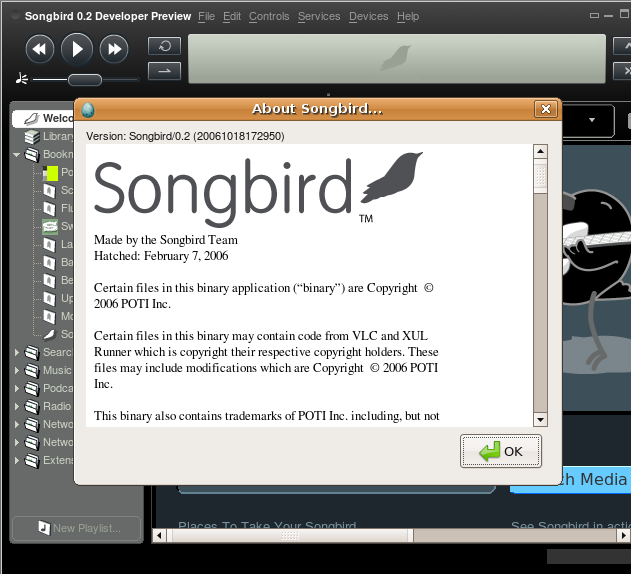
That's it your songbird music player is ready to play for music and it is really worth to install and try to play your music.I am sure you would love it.
Songbird Extensions
If you want to install Songbird Extensions check here
Thanks a lot!
Works great here on Ubuntu 9.04!
Or,
http://www.getdeb.net/search.php?keywords=songbird
For the “Cannot execute” error, there seems to be a conflict with libvisual-0.4-plugins (NVIDIA related package). Uninstall this package to get Songbird to work like a charm.
libvisual-0.4-plugins is a “Plugins for the libvisual audio visualization framework.” I removed it without any problems elsewhere.
sweet thanks for the tips in getting it up and
running.. now I can get to caching up all my
music.. that will probably be a day in itself..
lol..
when i remove the libviual package i then have problems with my Wine and World of Warcraft programs… i wonder if there is really only one or two files in the package that i can remove to be able to continue with both programs… any ideas? i am not so computer savvy as i would like… =D
Thanks very much for the help setting this up. And thanks to Phil as well for the tip about the software conflict, I would have never figured that out.
After I updated my gstreamer0.10-alsa, and a few other gstreamers package, I can’t open Songbird anymore. I get the following errors:
(songbird-bin:21694): GStreamer-WARNING **: Failed to load plugin ‘/usr/lib/gstreamer-0.10/libgsthdvparse.so’: /usr/lib/gstreamer-0.10/libgsthdvparse.so: undefined symbol: _gst_debug_dump_mem
(songbird-bin:21694): GStreamer-WARNING **: Failed to load plugin ‘/usr/lib/gstreamer-0.10/libgstmpegdemux.so’: /usr/lib/gstreamer-0.10/libgstmpegdemux.so: undefined symbol: _gst_debug_dump_mem
(songbird-bin:21694): GStreamer-WARNING **: Failed to load plugin ‘/usr/lib/gstreamer-0.10/libgstapp.so’: /usr/lib/libgstapp-0.10.so.0: undefined symbol: gst_buffer_list_get_type
(songbird-bin:21694): GStreamer-WARNING **: Failed to load plugin ‘/usr/lib/gstreamer-0.10/libgstlibvisual.so’: /usr/lib/gstreamer-0.10/libgstlibvisual.so: undefined symbol: gst_adapter_prev_timestamp
(songbird-bin:21694): GStreamer-WARNING **: Failed to load plugin ‘/usr/lib/gstreamer-0.10/libresindvd.so’: /usr/lib/gstreamer-0.10/libresindvd.so: undefined symbol: gst_navigation_event_parse_command
././songbird-bin: symbol lookup error: /usr/lib/python2.6/dist-packages/gst-0.10/gst/_gst.so: undefined symbol: gst_task_pool_get_type
Could not initialize GStreamer: Error re-scanning registry , child terminated by signal
Any help?
Thanks very much.
Here are some comments to the installation instructions at
http://www.ubuntugeek.com/install-songbird-music-player-in-ubuntu.html
Note: Some minor corrections:
RE: Now you are in /opt/Songbird directory run the following command to run songbird
./Songbird
N.B. its actually “songbird” with lower case “s” and would not run when I put it as a capital “S” in the command window.
This will open songbird application.
RE: Download Songbird Icon
If you want to create application menu you need to have songbird icon for this you can download from “here” under buttons section.
N.B. There was no “buttons section” at the above referenced URL [“here”]. I just googled google images for a songbird png.
RE: in this example i have downloaded the button_pickup.png and now you need to rename this icon as songbird using the following command
mv button_pickup.png songbird.png
N.B. The above is a “move” command if I’m not mistaken
RE: Now we need to place this icon in correct place i.e /usr/share/pixmaps using the following command.
N.B. This MIGHT be obvious but when you get here:
First thing is click on “no icon” tab to upload songbird icon you should see the following screen here you need to select the icon image location as /usr/share/pixmaps/songbird.png and click on ok
You will NOT see your songbird.png unless you hit “open” first while in the pixmaps folder.
Once those items were overcome its rockin! Thanks
I have the same problem as @Levi, can anyone help?
Same problem as Nic, any advice?? Songbird was fine until I upgraded to Karmic last week. Actually it still works fine on my little netbook which I upgraded as well. I uninstalled and encountered upon trying to reinstall. hmpf.
SO, I posted here as a last resort after searching all over to find a solution … no sooner did I post, did I find the solution: http://bugzilla.songbirdnest.com/show_bug.cgi?id=17082
fixed it for me!
Works on ubuntu 9.10
The songbird icon is already in the tgz package under songbird-512.png file
thanks!
If you still get here, there’s an easier way for Karmic Koala:
add-apt-repository ppa:songbird-daily
apt-get update
apt-get install songbird
As root, or go sudo.
And the last solution is the best. 🙂 Cheers Ana!
Ana, I love you.
————————————————
If you still get here, there’s an easier way for Karmic Koala:
add-apt-repository ppa:songbird-daily
apt-get update
apt-get install songbird
As root, or go sudo.
One more tks Ana for the short install!!! 🙂
And the the Ubuntu staff for the marvelous system.
*** glibc detected *** ././songbird-bin: free(): invalid pointer: 0xb132e2a0 ***
======= Backtrace: =========
/lib/tls/i686/cmov/libc.so.6[0xb7db4604]
/lib/tls/i686/cmov/libc.so.6(cfree+0x96)[0xb7db65b6]
/usr/lib/libvisual-0.4.so.0(visual_mem_free+0x21)[0xb1051141]
/usr/lib/libvisual-0.4.so.0[0xb1048407]
/usr/lib/libvisual-0.4.so.0(visual_plugin_get_list+0x73)[0xb10485e3]
/usr/lib/libvisual-0.4.so.0(visual_init+0x291)[0xb1057ec1]
/usr/lib/gstreamer-0.10/libgstlibvisual.so[0xb10b3273]
/opt/Songbird/lib/libgstreamer-0.10.so[0xb3ec2b2a]
/opt/Songbird/lib/libgstreamer-0.10.so(gst_plugin_load_file+0x93f)[0xb3ec36f1]
/opt/Songbird/lib/libgstreamer-0.10.so[0xb3ecfab6]
/opt/Songbird/lib/libgstreamer-0.10.so(gst_registry_scan_path+0x135)[0xb3ecfc5b]
/opt/Songbird/lib/libgstreamer-0.10.so[0xb3e7b34f]
/opt/Songbird/lib/libgstreamer-0.10.so[0xb3e7b83b]
/opt/Songbird/lib/libgstreamer-0.10.so[0xb3e7bea6]
/opt/Songbird/lib/libgstreamer-0.10.so[0xb3e7c46e]
/usr/lib/libglib-2.0.so.0(g_option_context_parse+0x5ab)[0xb6baadcb]
/opt/Songbird/lib/libgstreamer-0.10.so(gst_init_check+0xf1)[0xb3e7a60b]
/opt/Songbird/lib/libgstreamer-0.10.so(gst_init+0x32)[0xb3e7a715]
/opt/Songbird/lib/sbGStreamerMediacore.so(_ZN18sbGStreamerService4InitEv+0xa72)[0xb3d16016]
/opt/Songbird/lib/sbGStreamerMediacore.so[0xb3d1f8cf]
/opt/Songbird/lib/sbGStreamerMediacore.so[0xb3d37412]
/opt/Songbird/xulrunner/libxul.so[0xb766b165]
/opt/Songbird/xulrunner/libxul.so[0xb766a627]
/opt/Songbird/lib/sbGStreamerMediacore.so[0xb3d343fb]
/opt/Songbird/lib/sbGStreamerMediacore.so[0xb3d34425]
/opt/Songbird/lib/sbGStreamerMediacore.so[0xb3d33bd1]
/opt/Songbird/lib/sbGStreamerMediacore.so[0xb3d1d907]
/opt/Songbird/lib/sbGStreamerMediacore.so(_ZN27sbGStreamerMediacoreFactory4InitEv+0x4e)[0xb3d1e270]
/opt/Songbird/lib/sbGStreamerMediacore.so[0xb3d1f82f]
/opt/Songbird/lib/sbGStreamerMediacore.so[0xb3d37412]
/opt/Songbird/xulrunner/libxul.so[0xb766b165]
/opt/Songbird/components/sbMediacoreManager.so[0xb4571c19]
/opt/Songbird/components/sbMediacoreManager.so[0xb4571c46]
/opt/Songbird/components/sbMediacoreManager.so[0xb45714e1]
/opt/Songbird/components/sbMediacoreManager.so(_ZN8nsCOMPtrI19sbIMediacoreFactoryEC1ERK15nsCOMPtr_helper+0x2d)[0xb4558369]
/opt/Songbird/components/sbMediacoreManager.so(_ZN18sbMediacoreManager4InitEv+0x1b9)[0xb455536b]
/opt/Songbird/components/sbMediacoreManager.so[0xb4555704]
/opt/Songbird/xulrunner/libxul.so[0xb7647e53]
/opt/Songbird/xulrunner/libxul.so[0xb76483f8]
/opt/Songbird/xulrunner/libxul.so[0xb6ed4f74]
/opt/Songbird/xulrunner/libxul.so(XRE_main+0x19c4)[0xb6ed2c56]
././songbird-bin[0x8048f40]
/lib/tls/i686/cmov/libc.so.6(__libc_start_main+0xe5)[0xb7d5b775]
././songbird-bin[0x8048bb1]
======= Memory map: ========
08048000-0804e000 r-xp 00000000 08:03 157699 /opt/Songbird/songbird-bin
0804e000-0804f000 rw-p 00006000 08:03 157699 /opt/Songbird/songbird-bin
0814f000-08170000 rw-p 0814f000 00:00 0 [heap]
b1037000-b1073000 r-xp 00000000 08:03 10294 /usr/lib/libvisual-0.4.so.0.0.0
b1073000-b1074000 r–p 0003b000 08:03 10294 /usr/lib/libvisual-0.4.so.0.0.0
b1074000-b1075000 rw-p 0003c000 08:03 10294 /usr/lib/libvisual-0.4.so.0.0.0
b1086000-b10a2000 r-xp 00000000 08:03 130482 /usr/lib/libtwolame.so.0.0.0
b10a2000-b10a4000 rw-p 0001b000 08:03 130482 /usr/lib/libtwolame.so.0.0.0
b10a4000-b10a8000 rw-p b10a4000 00:00 0
b10ab000-b10b1000 rw-p b10ab000 00:00 0
b10b1000-b10b7000 r-xp 00000000 08:03 12597 /usr/lib/gstreamer-0.10/libgstlibvisual.so
b10b7000-b10b8000 r–p 00005000 08:03 12597 /usr/lib/gstreamer-0.10/libgstlibvisual.so
b10b8000-b10b9000 rw-p 00006000 08:03 12597 /usr/lib/gstreamer-0.10/libgstlibvisual.so
b10b9000-b1102000 r-xp 00000000 08:03 108986 /usr/lib/gstreamer-0.10/libgstmxf.so
b1102000-b1103000 —p 00049000 08:03 108986 /usr/lib/gstreamer-0.10/libgstmxf.so
b1103000-b1104000 r–p 00049000 08:03 108986 /usr/lib/gstreamer-0.10/libgstmxf.so
b1104000-b1105000 rw-p 0004a000 08:03 108986 /usr/lib/gstreamer-0.10/libgstmxf.so
b1105000-b110f000 r-xp 00000000 08:03 111841 /usr/lib/gstreamer-0.10/libgstrawparse.so
b110f000-b1110000 r–p 00009000 08:03 111841 /usr/lib/gstreamer-0.10/libgstrawparse.so
b1110000-b1111000 rw-p 0000a000 08:03 111841 /usr/lib/gstreamer-0.10/libgstrawparse.so
b1111000-b112c000 r-xp 00000000 08:03 22386 /usr/lib/sse2/libspeex.so.1.5.0
b112c000-b112d000 r–p 0001a000 08:03 22386 /usr/lib/sse2/libspeex.so.1.5.0
b112d000-b112e000 rw-p 0001b000 08:03 22386 /usr/lib/sse2/libspeex.so.1.5.0
b112e000-b117d000 r-xp 00000000 08:03 10259 /usr/lib/libtheora.so.0.3.4
b117d000-b117e000 r–p 0004e000 08:03 10259 /usr/lib/libtheora.so.0.3.4
b117e000-b117f000 rw-p 0004f000 08:03 10259 /usr/lib/libtheora.so.0.3.4
b117f000-b118d000 r-xp 00000000 08:03 10204 /usr/lib/libshout.so.3.2.0
b118d000-b118e000 r–p 0000d000 08:03 10204 /usr/lib/libshout.so.3.2.0
b118e000-b118f000 rw-p 0000e000 08:03 10204 /usr/lib/libshout.so.3.2.0
b1191000-b119e000 r-xp 00000000 08:03 50423 /usr/lib/gstreamer-0.10/libgstjpeg.so
b119e000-b119f000 r–p 0000c000 08:03 50423 /usr/lib/gstreamer-0.10/libgstjpeg.so
b119f000-b11a0000 rw-p 0000d000 08:03 50423 /usr/lib/gstreamer-0.10/libgstjpeg.so
b11a0000-b11e7000 r-xp 00000000 08:03 86496 /usr/lib/libmodplug.so.0.0.0
b11e7000-b11e8000 r–p 00047000 08:03 86496 /usr/lib/libmodplug.so.0.0.0
b11e8000-b11eb000 rw-p 00048000 08:03 86496 /usr/lib/libmodplug.so.0.0.0
b11eb000-b126b000 rw-p b11eb000 00:00 0
b126b000-b1273000 r-xp 00000000 08:03 130538 /usr/lib/gstreamer-0.10/libgsttwolame.so
b1273000-b1274000 r–p 00007000 08:03 130538 /usr/lib/gstreamer-0.10/libgsttwolame.so
b1274000-b1275000 rw-p 00008000 08:03 130538 /usr/lib/gstreamer-0.10/libgsttwolame.so
b1275000-b127a000 r-xp 00000000 08:03 50739 /usr/lib/gstreamer-0.10/libgstshout2.so
b127a000-b127b000 r–p 00004000 08:03 50739 /usr/lib/gstreamer-0.10/libgstshout2.so
b127b000-b127c000 rw-p 00005000 08:03 50739 /usr/lib/gstreamer-0.10/libgstshout2.so
b127c000-b128d000 r-xp 00000000 08:03 80133 /usr/lib/libcdaudio.so.1.0.0
b128d000-b128e000 r–p 00010000 08:03 80133 /usr/lib/libcdaudio.so.1.0.0
b128e000-b128f000 rw-p 00011000 08:03 80133 /usr/lib/libcdaudio.so.1.0.0
b1298000-b129e000 r-xp 00000000 08:03 108974 /usr/lib/gstreamer-0.10/libgstmodplug.so
b129e000-b129f000 r–p 00005000 08:03 108974 /usr/lib/gstreamer-0.10/libgstmodplug.so
b129f000-b12a0000 rw-p 00006000 08:03 108974 /usr/lib/gstreamer-0.10/libgstmodplug.so
b12a0000-b12a4000 r-xp 00000000 08:03 107228 /usr/lib/gstreamer-0.10/libgstcdaudio.so
b12a4000-b12a5000 r–p 00003000 08:03 107228 /usr/lib/gstreamer-0.10/libgstcdaudio.so
b12a5000-b12a6000 rw-p 00004000 08:03 107228 /usr/lib/gstreamer-0.10/libgstcdaudio.so
b12a6000-b12b2000 r-xp 00000000 08:03 87384 /usr/lib/libSoundTouch.so.1.0.0
b12b2000-b12b4000 rw-p 0000b000 08:03 87384 /usr/lib/libSoundTouch.so.1.0.0
b12b7000-b12c3000 r-xp 00000000 08:03 12606 /usr/lib/gstreamer-0.10/libgstpango.so
b12c3000-b12c4000 r–p 0000b000 08:03 12606 /usr/lib/gstreamer-0.10/libgstpango.so
b12c4000-b12c5000 rw-p 0000c000 08:03 12606 /usr/lib/gstreamer-0.10/libgstpango.so
b12c5000-b12db000 r-xp 00000000 08:03 113501 /usr/lib/libmad.so.0.2.1
b12db000-b12dc000 r–p 00015000 08:03 113501 /usr/lib/libmad.so.0.2.1
b12dc000-b12dd000 rw-p 00016000 08:03 113501 /usr/lib/libmad.so.0.2.1
b12dd000-b12e5000 r-xp 00000000 08:03 112024 /usr/lib/gstreamer-0.10/libgstsoundtouch.so
b12e5000-b12e6000 r–p 00007000 08:03 112024 /usr/lib/gstreamer-0.10/libgstsoundtouch.so
b12e6000-b12e7000 rw-p 00008000 08:03 112024 /usr/lib/gstreamer-0.10/libgstsoundtouch.so
b12e7000-b12ec000 r-xp 00000000 08:03 107219 /usr/lib/gstreamer-0.10/libgstalsaspdif.so
b12ec000-b12ed000 r–p 00005000 08:03 107219 /usr/lib/gstreamer-0.10/libgstalsaspdif.so
b12ed000-b12ee000 rw-p 00006000 08:03 107219 /usr/lib/gstreamer-0.10/libgstalsaspdif.so
b12ee000-b12fe000 r-xp 00000000 08:03 130532 /usr/lib/gstreamer-0.10/libgstmad.so
b12fe000-b12ff000 r–p 0000f000 08:03 130532 /usr/lib/gstreamer-0.10/libgstmad.so
b12ff000-b1300000 rw-p 00010000 08:03 130532 /usr/lib/gstreamer-0.10/libgstmad.so
b1300000-b1400000 rw-p b1300000 00:00 0
b1400000-b140e000 r-xp 00000000 08:03 113216 /usr/lib/libid3tag.so.0.3.0
b140e000-b1410000 rw-p 0000d000 08:03 113216 /usr/lib/libid3tag.so.0.3.0
b1410000-b1427000 r-xp 00000000 08:03 12623 /usr/lib/gstreamer-0.10/libgsttcp.so
b1427000-b1428000 r–p 00016000 08:03 12623 /usr/lib/gstreamer-0.10/libgsttcp.so
b1428000-b1429000 rw-p 00017000 08:03 12623 /usr/lib/gstreamer-0.10/libgsttcp.so
b1429000-b1450000 r-xp 00000000 08:03 80081 /usr/lib/gstreamer-0.10/libpitfdll.so
b1450000-b1451000 r–p 00026000 08:03 80081 /usr/lib/gstreamer-0.10/libpitfdll.so
b1451000-b145a000 rw-p 00027000 08:03 80081 /usr/lib/gstreamer-0.10/libpitfdll.so
b145a000-b1463000 rw-p b145a000 00:00 0
b1463000-b1482000 r-xp 00000000 08:03 9952 /usr/lib/libjpeg.so.62.0.0
b1482000-b1483000 rw-p 0001e000 08:03 9952 /usr/lib/libjpeg.so.62.0.0
b1483000-b14c8000 r-xp 00000000 08:03 9950 /usr/lib/libjasper.so.1.0.0
b14c8000-b14c9000 r–p 00044000 08:03 9950 /usr/lib/libjasper.so.1.0.0
b14c9000-b14cc000 rw-p 00045000 08:03 9950 /usr/lib/libjasper.so.1.0.0
b14cc000-b14d2000 rw-p b14cc000 00:00 0
b14d2000-b14d4000 r-xp 00000000 08:03 87383 /usr/lib/libBPM.so.1.0.0
b14d4000-b14d6000 rw-p 00001000 08:03 87383 /usr/lib/libBPM.so.1.0.0
b14d6000-b14dc000 r-xp 00000000 08:03 107230 /usr/lib/gstreamer-0.10/libgstcdxaparse.so
b14dc000-b14dd000 r–p 00005000 08:03 107230 /usr/lib/gstreamer-0.10/libgstcdxaparse.so
b14dd000-b14de000 rw-p 00006000 08:03 107230 /usr/lib/gstreamer-0.10/libgstcdxaparse.so
b14de000-b14e1000 r-xp 00000000 08:03 50791 /usr/lib/gstreamer-0.10/libgstvideobalance.so
b14e1000-b14e2000 r–p 00002000 08:03 50791 /usr/lib/gstreamer-0.10/libgstvideobalance.so
b14e2000-b14e3000 rw-p 00003000 08:03 50791 /usr/lib/gstreamer-0.10/libgstvideobalance.so
b14e3000-b1502000 r-xp 00000000 08:03 87308 /usr/lib/libneon-gnutls.so.27.1.2
b1502000-b1503000 r–p 0001f000 08:03 87308 /usr/lib/libneon-gnutls.so.27.1.2
b1503000-b1504000 rw-p 00020000 08:03 87308 /usr/lib/libneon-gnutls.so.27.1.2
b1504000-b1509000 r-xp 00000000 08:03 112014 /usr/lib/gstreamer-0.10/libgstrtpmux.so
b1509000-b150a000 r–p 00004000 08:03 112014 /usr/lib/gstreamer-0.10/libgstrtpmux.so
b150a000-b150b000 rw-p 00005000 08:03 112014 /usr/lib/gstreamer-0.10/libgstrtpmux.so
b150b000-b1513000 r-xp 00000000 08:03 108035 /usr/lib/gstreamer-0.10/libgstjp2k.so
b1513000-b1514000 r–p 00007000 08:03 108035 /usr/lib/g
it doesn’t work for me, any ideas?
Holy crap! What took me so long to discover Songbird!? I’ve been using Rhythmbox and Amarok for a while now but OMG the features of Songbird are lightyears ahead of the other apps I’ve used.
Thanks for this post and a big thanks to Ana! I was dreading having to go through all those steps 😉
Cheers!
Thanks to the post. Works like charm.
I was struggling to find a good music player on Ubuntu. Was struggling with getting Winamp to work with the Wine.
Till i found Songbird, its the best out there. Now, I can kiss Winamp goodbye.
Thanks, Ana. Couldn’t get it working without your help.
thankx Ana, counld’t get it to work without your help!
For KDE, right-click the “K” button to access the “Menu Editor”
Thank you. I’ve now got Songbird working with Ubuntu Remix 10.04 on my HP Mini 110.
Thaks a lot……for your advice
Ana…. is very easy install sonbird
Thanks a lot dude.. Worked liked a charm.
hi, i have a little problem with my songbird, i have it on ubuntu 9.10. the problem is that it doesn’t show the lyrics anymore, and i don’t know why. I tried re-installing LyricsMaster but nothing happened, it only shows the link to lyricsvip.com, I’d appreciate if somebody could help me out to fix this problem.
Great work! Even i managed toinstall it 🙂 Thanks a lot!