

Sponsored Link
This package contains a simple compizconfig settings manager application
Install Simple Compizconfig settings manager in ubuntu 8.04
sudo aptitude install simple-ccsm
This will complete the installation.
Using Simple Compizconfig settings manager
If you want to open Simple Compizconfig settings manager go to System--->Preferences--->Simple Compizconfig settings manager

Once it opens you should see similar to the following screen from here you can configure

If you want to access complete compiz configuration options you need to install the following package compizconfig-settings-manager
sudo aptitude install compizconfig-settings-manager
This will complete the installation.
If you want to access compizconfig-settings-manager Go to System--->Preferences--->Advanced Desktop Effects Settings
Once it opens you should see similar to the following option
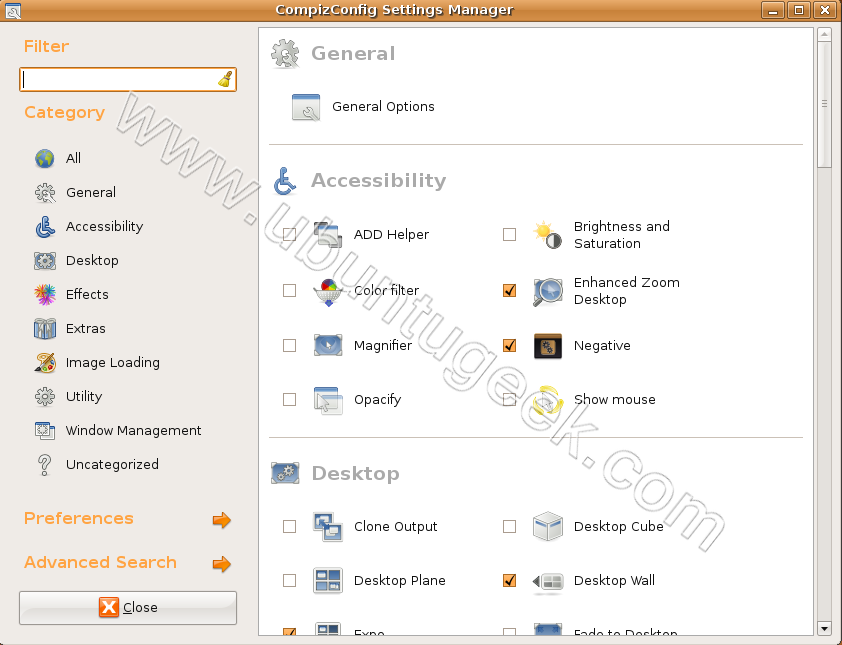
If you use any one of the above tool you need to have the custom effects option selected.
hola!!!
Soy nueva en esto sobre ubuntu!! y pues yo le quise poner el compiz,, pero lo instale desde aplicaciones/añadir y quitar.. asi que a mi me aparece desde aplicaciones/herramientas del sistema/compiz fusion Icon
(aparece un icono azul del lado izquierdo al darle click a compiz fusion Icon)
Ya que esta el icono azul desde ahi accedo a las ventanas pero no sucede nada…
y si lo tengo que hacer desde la terminal que codigo le pongo!!!!
AYUDA !!!!!