

Sponsored Link
StartUp Manager Features
Change
Grub timeout
Default boot title
Number of kernels in bootloader menu
Enable/disable boot option for memtest86
Enable/disable boot option for "rescue mode"
If the default boot option should be automatically updated
Bootup resolution and color depth
Grub menu colors
Grub menu resolution(Grub2 only)
If Splashy should be loaded from initramfs
Create
Rescue floppy
Change visibility of
Grub menu
Grub menu colors
Grub menu background image
Splash screen and boot text
Password protect
Grub menu from editing
"Alternate" boot options
Old boot options
Themes
Install/change/remove Grub backgrounds
Install/change/remove Usplash themes
Install/change/remove Splashy themes
Preview Splashy themes
Install StartUp Manager in Ubuntu
sudo apt-get install startupmanager
This will complete the installtion
Using StartUp Manager
If you want to open StartUp Manager go to System--->Administration--->Startup-Manager
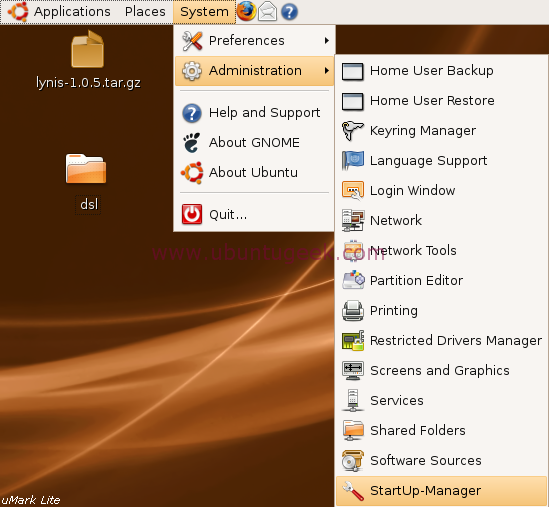
This will prompt for root password enter and click ok

Once it open you should see similar to the following screen here you can change boot options screen

If you want to change appearance change on this screen

Security screen

Advanced screen

Damned, in Ubuntu 10.10, startupmanager 1.9.13-5 doesn’t shown half of the tabs & settings ???
AND using ESC to enter the boot menu doesn’t seem to work DO NOT SET timeout to 0-sec
hola me servio para solucionar el problema de inicio de “Frecuencia fuera de margen” en el monitor que no me dejaba ver el grub para las opciones de los distintos sistemas operativos.
sudo apt-get install startupmanager
en terminal startupmanager
pantalla 800 x 600 colores en 8bit por defecto
avanzado/ 800 x 600
11.10
Using Ubuntu, When I do “sudo apt-get install startupmanager” I’m told:
Reading package lists… Done
Building dependency tree
Reading state information… Done
The following extra packages will be installed:
menu
The following NEW packages will be installed:
menu startupmanager
0 upgraded, 2 newly installed, 0 to remove and 1 not upgraded.
Need to get 536kB of archives.
After this operation, 3,084kB of additional disk space will be used.
Do you want to continue [Y/n]? y
WARNING: The following packages cannot be authenticated!
menu startupmanager
Install these packages without verification [y/N]? y
Err http://ca.archive.ubuntu.com karmic/universe menu 2.1.41ubuntu1
404 Not Found [IP: 91.189.92.179 80]
Err http://ca.archive.ubuntu.com karmic/universe startupmanager 1.9.12-1ubuntu1
404 Not Found [IP: 91.189.92.179 80]
Failed to fetch http://ca.archive.ubuntu.com/ubuntu/pool/universe/m/menu/menu_2.1.41ubuntu1_i386.deb 404 Not Found [IP: 91.189.92.179 80]
Failed to fetch http://ca.archive.ubuntu.com/ubuntu/pool/universe/s/startupmanager/startupmanager_1.9.12-1ubuntu1_all.deb 404 Not Found [IP: 91.189.92.179 80]
E: Unable to fetch some archives.
When I typed:
“sudo apt-get install startupmanager”
The Terminal said the package did not exist.
I am running Linux Mint which is meant to be based on Ubuntu.
I only see “Boot Options” and “Advanced” tabs… Debian Wheezy.