

Sponsored Link
It happens sometimes you need to access your files on Linux partitions from Windows, and you realize it isn’t possible easily. Not really, with these tools in hand -- it’s very easy for you to access files on your Linux partitions from Windows
Explore2fs
Explore2fs is a GUI explorer tool for accessing ext2 and ext3 filesystems. It runs under all versions of Windows and can read almost any ext2 and ext3 filesystem.
Project Home Page :- http://www.chrysocome.net/explore2fs
Latest Version :- 1.07
Sample Screenshot

DiskInternals Linux Reader
DiskInternals Linux Reader is a new easy way to do this. This program plays the role of a bridge between your Windows and Ext2/Ext3 Linux file systems. This easy-to-use tool runs under Windows and allows you to browse Ext2/Ext3 Linux file systems and extract files from there.
Project Home Page :- http://www.diskinternals.com/linux-reader/
Latest Version :- 1.0
Sample Screenshot

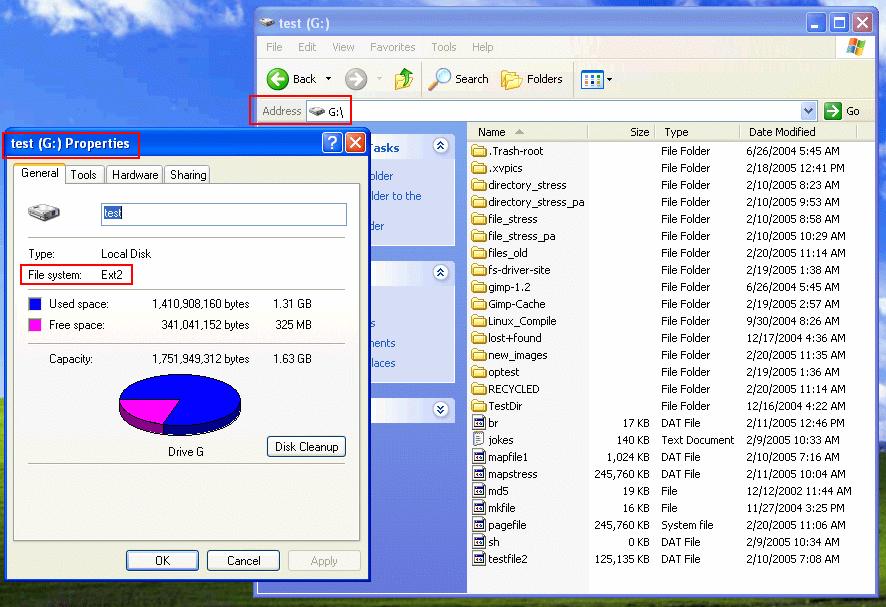
Ext2 Installable File System for Windows
It provides Windows NT4.0/2000/XP/2003 with full access to Linux Ext2 volumes (read access and write access). This may be useful if you have installed both Windows and Linux as a dual boot environment on your computer.
Project Home Page :- http://www.fs-driver.org/
Latest Version :- 1.10c
Sample Screenshot
rfsd: ReiserDriver
ReiserDriver is an Installable File System Driver (IFSD), used to easily (and natively!) read ReiserFS disk partitions under Microsoft Windows (2K/XP) by allowing ReiserFS partitions to appear as additional disks to the Windows operating system.
Project Home Page :- http://sourceforge.net/projects/rfsd/
Latest Version :- 1
I actually solved this problem by just getting rid of Windoze.