

Sponsored Link
Install C and C++ Compilers in Ubuntu
sudo aptitude install build-essential
This will install all the required packages for C and C++ compilers
Testing C and C++ Programs
Compiling Your first C Programs
Now you need to open first.c file
sudo gedit first.c
add the following lines save and exit the file

Firstly compile the code using the following command
cc -c first.c
that would produce an object file you may need to add to the library.
then create an executable using the following command
cc -o first first.c
Now run this executable using the following command
./first
Output should show as follows
Hello, world
Compiling your first C++ program
If you want to run c++ program follow this procedure
g++ is the compiler that you must use.
you should use a .cpp file extension rather than a .c one
You need to create a file
sudo gedit first.cpp
add the following lines save and exit the file
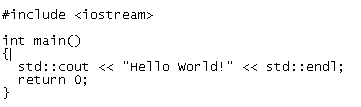
Run your C++ Program using the following command
g++ first.cpp -o test
./test
Output should show as follows
Hello World!
There is no need for being root, when editing your source code. So, call gedit WITHOUT sudo.
Cheers,
Martin
> sudo gedit
omg you fail
karl@ubuntu:~$ g++ first.cpp -o test
first.cpp:5: error: stray ‘\357’ in program
first.cpp:5: error: stray ‘\243’ in program
first.cpp:5: error: stray ‘\271’ in program
first.cpp: In function ‘int main()’:
first.cpp:4: error: expected primary-expression before ‘|’ token
first.cpp:5: error: ‘end’ is not a member of ‘std’
karl@ubuntu:~$ ./test
bash: ./test: No such file or directory
the c++ didn’t work for me
karl@ubuntu:~$ g++ first.cpp -o test
first.cpp:5: error: stray ‘\357’ in program
first.cpp:5: error: stray ‘\243’ in program
first.cpp:5: error: stray ‘\271’ in program
first.cpp: In function ‘int main()’:
first.cpp:4: error: expected primary-expression before ‘|’ token
first.cpp:5: error: ‘end’ is not a member of ‘std’
karl@ubuntu:~$ ./test
bash: ./test: No such file or directory
Never call your test program “test”. There is already a system utility called “test”. If you run “test” instead of “./test” you’ll have endless hours of fun:-)
“””first.cpp:5: error: stray ‘\357’ in program”””
looks like non-ASCII characters in your source file. Did you use a wordprocessor to edit it by any chance?
“””first.cpp:5: error: ‘end’ is not a member of ‘std’”””
it’s “endl”, not “end”. Note the trailing “eL” for end-line.
It would be better if you use gcc compiler instead of cc.
Akshar, cc is gcc on *buntu.
>sudo gedit
omg you fail
Thanks a lot for this tutorial =)
now it worked using this:
#include
using namespace std;
int main()
{
cout<<“HEY, you, I’m alive! Oh, and Hello World!\n”;
cin.get();
}
now it worked using this:
#include
using namespace std;
int main()
{
cout<<“HEY, you, I’m alive! Oh, and Hello World!\n”;
cin.get();
}
the word doesn’t appear. is:#include
iostream
Damn. Using Windows compilers, like Borland 3.11 or Builder is more easier… Need more practice, I think.
But hey, thx for man!
I have c program file with make file, How i can run in ubuntu 8.04
2nd program did not work for me on ubuntu 8.04
i get
~$ g++ first.cpp -o code
first.cpp: In function ‘int main()’:
first.cpp:4: error: ‘end1’ is not a member of ‘std’
first.c:1:18: error: stdio.h: No such file or directory
first.c: In function ‘main’:
first.c:4: warning: incompatible implicit declaration of built-in function ‘printf’
this error is coming
@akash
did you install the following package
sudo apt-get install build-essential
yes i have install this
actually i am a new user to ubuntu so don’t know much of it
i hav jus copied this string ” sudo apt-get install build-essential”
no error came in this installation
but when i am running the program it shows ther error in stdio.h main etc
pls tell me wat to do…..
should i install the GCC compiler…
hi,
i’ve just installed ubuntu. i would like to install gcc. do i really have to have an internet connection to install gcc? 🙁 if so, i have a problem. i use a netcard for the internet and it doesnt seem to support a device driver for the same on ubuntu. now, hoe do i proceed??
P.S. i’ve tried synaptic..(not working)
and, build-essential (not available)
i have downloades GCC (4.3.2) compiler from the website
i want to know how to install….
as i am a new user so plz give the necessary command to install GCC compiler
I am trying to develop software for Ubuntu for fun. I come with some experience with programming in MS Windows. My question is how to program in C++ with a graphical user interface. In windows you could run a C++ program and a window would pop up. You could also use MFC to get even more fancy. So question is, how do you do that with Ubuntu? If you know, please email me at [email protected]! Thanks!
@Matthew
Try Eclipse with the CDT plug-in. You can get it via the repositories with this command:
sudo apt-get install eclipse eclipse-cdt
or try to download codeblocks
Download from here
I have a problem when i do the cpp code and try to do the
g++ first.cpp -o test
this is what i get..
/usr/bin/ld: cannot open output file code: Permission denied
dont know what im doing wrong but please help me.
I also did it in root did not work
email me at [email protected]
I am newbie,
I am trying to run the following program;
#include
#include
#include
using namespace std;
void c_to_f(void);
void f_to_c(void);
void
main(void)
{
int choice;
char again;
do
{
system(“CLS”);
cout<<setw(10)<<” “<< “What conversion would you like to make?\n”;// menu
cout<<setw(20)<<” “<< “1. Celsius to Fahrenhei\n\n”;
// make a choice which functions to use.
cout<<setw(20)<<” “<>choice;
switch(choice)
// go to chosen function
{
case 1:
{
c_to_f();
break;
}
case 2:
{
f_to_c();
break;
}
default:
{
cout<<setw(10)<<” “<< “Enter 1 ot 2 “<< endl;
// validate and correct input of function choice.
}
}
cout<<setw(10)<<” “<> again;
}while (again=’Y’||again=’y’;
}
void c_to_f(void)
{
system(“CLS”); //clean screen for function data.
int temp,fahrenheit;
cout<< “\n\n\n “;
cout<<setw(10)<<” “<>temp;
fahrenheit=((temp*9)/5)+32;
cout<<endl<<setw(10)<<” “<<temp<<” degrees celsius is ” <<fahrenheit\a\n\n\n “;
}
void f_to_c(void)
{
system(“CLS”); // clear screen for function data.
int temp, celsius;
cout<< “\n\n\n “;
cout<<setw(10)<<” “<>temp;
celsius=((temp-32)*5)/9;
cout<<endl<<setw(10)<<” “temp<<” degrees fahrenheit is “<<celsius<<” degrees celsius \a\\n\n\n”;
}
But it doesn’t compille it gives following errors;
#include
#include
#include
using namespace std;
void c_to_f(void);
void f_to_c(void);
void
main(void)
{
int choice;
char again;
do
{
system(“CLS”);
cout<<setw(10)<<” “<< “What conversion would you like to make?\n”;// menu
cout<<setw(20)<<” “<< “1. Celsius to Fahrenhei\n\n”;
// make a choice which functions to use.
cout<<setw(20)<<” “<>choice;
switch(choice)
// go to chosen function
{
case 1:
{
c_to_f();
break;
}
case 2:
{
f_to_c();
break;
}
default:
{
cout<<setw(10)<<” “<< “Enter 1 ot 2 “<< endl;
// validate and correct input of function choice.
}
}
cout<<setw(10)<<” “<> again;
}while (again=’Y’||again=’y’;
}
void c_to_f(void)
{
system(“CLS”); //clean screen for function data.
int temp,fahrenheit;
cout<< “\n\n\n “;
cout<<setw(10)<<” “<>temp;
fahrenheit=((temp*9)/5)+32;
cout<<endl<<setw(10)<<” “<<temp<<” degrees celsius is ” <<fahrenheit\a\n\n\n “;
}
void f_to_c(void)
{
system(“CLS”); // clear screen for function data.
int temp, celsius;
cout<< “\n\n\n “;
cout<<setw(10)<<” “<>temp;
celsius=((temp-32)*5)/9;
cout<<endl<<setw(10)<<” “temp<<” degrees fahrenheit is “<<celsius<<” degrees celsius \a\\n\n\n”;
}
bharat@Bharat-desktop:~/C++Examples$ g++ Temp.cpp -o Temp
Temp.cpp:1:22: error: iostream.h: No such file or directory
Temp.cpp:2:21: error: iomanip.h: No such file or directory
Temp.cpp:64: error: stray ‘\’ in program
Temp.cpp:64: error: stray ‘\’ in program
Temp.cpp:64: error: stray ‘\’ in program
Temp.cpp:64: error: stray ‘\’ in program
Temp.cpp:64:79: warning: missing terminating ” character
Temp.cpp:64: error: missing terminating ” character
Temp.cpp:9: error: ‘::main’ must return ‘int’
Temp.cpp: In function ‘int main()’:
Temp.cpp:17: error: ‘cout’ was not declared in this scope
Temp.cpp:17: error: ‘setw’ was not declared in this scope
Temp.cpp:21: error: ‘cin’ was not declared in this scope
Temp.cpp:38: error: ‘endl’ was not declared in this scope
Temp.cpp:48: error: lvalue required as left operand of assignment
Temp.cpp:48: error: expected `)’ before ‘;’ token
Temp.cpp: In function ‘void c_to_f()’:
Temp.cpp:58: error: ‘cout’ was not declared in this scope
Temp.cpp:59: error: ‘setw’ was not declared in this scope
Temp.cpp:60: error: ‘cin’ was not declared in this scope
Temp.cpp:64: error: ‘endl’ was not declared in this scope
Temp.cpp:64: error: expected `;’ before ‘a’
Temp.cpp: In function ‘void f_to_c()’:
Temp.cpp:72: error: ‘cout’ was not declared in this scope
Temp.cpp:73: error: ‘setw’ was not declared in this scope
Temp.cpp:74: error: ‘cin’ was not declared in this scope
Temp.cpp:77: error: ‘endl’ was not declared in this scope
Temp.cpp:77: error: expected `;’ before ‘temp’
bharat@Bharat-desktop:~/C++Examples$
Please help.
Thanking you,
Bharat
I am new to ubuntu, please anyone can help me with the gcc compiler, how to install it, and run in ubuntu.
abhinandan
this was just ausim . . . . .
good dude . . . . .
first.cpp dot’t work.
there is no iostream.h file in include