

Sponsored Link
The language itself derives much of its syntax from C and C++ but has a simpler object model and fewer low-level facilities. JavaScript, a scripting language, shares a similar name and has similar syntax, but is not directly related to Java.
Currently Ubuntu has the following Java packages
sun-java6-bin -- Contains the binaries
sun-java6-demo -- Contains demos and examples
sun-java6-doc -- Contains the documentation
sun-java6-fonts -- Contains the Lucida TrueType fonts from the JRE
sun-java6-jdk -- Contains the metapackage for the JDK
sun-java6-jre -- Contains the metapackage for the JRE
sun-java6-plugin -- Contains the plug-in for Mozilla-based browsers
sun-java6-source -- Contains source files for the JDK
Installing the Java Runtime Environment
First you need to check multiverse repository enabled or not after that open a terminal window. Since you are going to be installing the JRE and the web browser plug-in, you’ll be using the following command from a terminal
sudo apt-get install sun-java6-jre sun-java6-plugin sun-java6-fonts
Once it downloads the packages and begins the installation, you’ll get a screen that contains the Sun Operating System Distributor License for Java and hit Enter to continue.

You’ll see a dialog that asks you if you agree with the DLJ license terms. Select Yes, and hit Enter; the JRE will finish installing.

Testing Java Runtime Environment
You’ll want to confirm that your system is configured properly for Sun’s JRE. This is a two-step process.
First, check that the JRE is properly installed by running the following command from a terminal.
java -version
You should get similar output

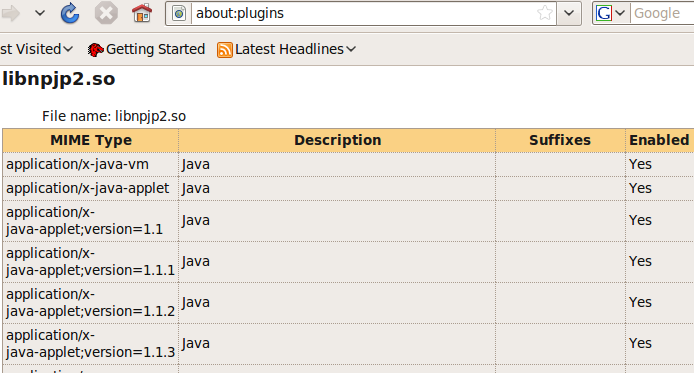
Testing Java Plugin for Firefox
open Firefox and typing about:plugins in the address bar and check for java plugin
I ran your install command and ended up with the agreement text you show above. However, selecting and hitting Enter did nothing at all. I’ve downloaded a heap of stuff and don’t know what to do with it or even how to get rid of it. What should I do now?
John, read my old comment (july? last year, use “Older comments” above) how to work around.
Oh, here it is:
This is how I worked around the problem:
Open a terminal window.
sudo apt-get -f install
sudo apt-get -update
Sometimes you need to run
sudo apt-get -update
a couple of times – this should clean up
Start (from menu)
System -> Administration -> Synaptic Package Manager
In the upper left corner you see the word
All
if it isn’t already selected, click on it (the word then gets highlighted)
In search window write
jre
Select
Install
John,
Should you ever have this problem installing from the terminal, hit the tab key first to highlight the or key, then hit Enter.
Thanks John.St – I’ll try it a bit later when I’m at my Linux computer.
Hey ..
This is very helpful.
Keep posting ..
the above steps working fine.but how long it takes to show the “yes no” dialog box ? i was waiting for 15 minutes after i got the “operator license aggrement” . . . . . .
Thanks a lot.. This was very helpful article.
Thanks a lot guys. Almost given up on Linux as the Java was difficult to install but with your comments , it works..Big thank you
– Works with Ubuntu 10.4 (Lucid Lynx) 32-bit!!! Simple!!!!! Great work guys! In case you are wondering where the java path is :
/usr/lib/jvm/java-6-sun-xx.xx.xx
Great Post guys!!
Thanks for this help but I still have problems withs jre in firefox. It seems I have to make a symbolic link to libjavaplugin_oji.in Mozilla Plugins directory. How to I do this?
merci bbbbbbbbbbbbb
I’m facing this problem
administrator@ubuntu:~$ sudo apt-get install sun-java6-jre sun-java6-plugin sun-java6-fonts
Reading package lists… Done
Building dependency tree
Reading state information… Done
Package sun-java6-jre is not available, but is referred to by another package.
This may mean that the package is missing, has been obsoleted, or
is only available from another source
E: Package sun-java6-jre has no installation candidate
Saurav, use
System -> Administration -> Synaptic Packet Manager
Search for sun-java6-jre
that should fix it.
If not, check System -> Administration -> Software Sources
Ubuntu Software: 4 in top checkmarked
Other software: …ubuntu hardy partner checkmarked
works for me
Hi,
Can you please help me out for the following problem:
sukanta@ubuntu:/$ sudo apt-get install openjdk-6-jre
E: Could not get lock /var/lib/dpkg/lock – open (11: Resource temporarily unavailable)
E: Unable to lock the administration directory (/var/lib/dpkg/), is another process using it?
while installing the JRE in ubuntu 10.4?
also i used the following command to install the Java:
sudo apt-get install sun-java6-jdk
Sukanta, it means exactly what it says, you have an other instance of either Update Manager or Synaptic PM running (watch icons on top panel for orange star w/ arrow).
A reboot solves the problem – or you can wait it out.
Better still, read through this thread and find the solution with Synaptic Packet Manager – easier.
i can’t hit the enter in licences .
how can i do this?
Use tab key to select yes
Why is installing java so difficult in ubuntu ?
I get the following error when trying to follow instructions above:
Reading package lists… Done
Building dependency tree
Reading state information… Done
Package sun-java6-jre is not available, but is referred to by another package.
This may mean that the package is missing, has been obsoleted, or
is only available from another source
E: Package sun-java6-jre has no installation candidate
All I want to do with Java is access a chat room that was created in the mid 1990’s…. I don’t need some wild “flavor” of java or development tools.
Budro, use
System -> Synaptic package Manager
to install sun-java6-jre
– as easy as falling down the stairs.
I think you have to start with System -> Software Sources adding “archive.canonical.com/ubuntu hardy partner” and perhaps also “unsupported updates” in ‘Other software’ – I am not sure but it won’t harm to do so.
Budro, read also
John.St says:
July 5, 2010 at 7:53 pm
above
i got the following:
Reading package lists… Done
Building dependency tree
Reading state information… Done
Package sun-java6-jre is not available, but is referred to by another package.
This may mean that the package is missing, has been obsoleted, or
is only available from another source
Package sun-java6-fonts is not available, but is referred to by another package.
This may mean that the package is missing, has been obsoleted, or
is only available from another source
Package sun-java6-plugin is not available, but is referred to by another package.
This may mean that the package is missing, has been obsoleted, or
is only available from another source
E: Package ‘sun-java6-jre’ has no installation candidate
E: Package ‘sun-java6-plugin’ has no installation candidate
E: Package ‘sun-java6-fonts’ has no installation candidate
Hi,
Thanks for sharing.
I would like to know to update latest Java.
I am using Ubuntu 9.10 and current Java is “1.6.0_18”
how do I do it?
Thanks!!!
I have done it on ubuntu 11.04 with the command
sudo apt-get install openjdk-6-jre-headless
Hope i helped you
F.
Can you please help me out for the following problem:
none@none:~$ sudo apt-get install sun-java6-jre sun-java6-plugin sun-java6-fonts[sudo] password for none:
Reading package lists… Done
Building dependency tree
Reading state information… Done
You might want to run ‘apt-get -f install’ to correct these:
The following packages have unmet dependencies:
sun-java6-jre : Depends: sun-java6-bin (>= 6.24-1build0.10.10.1) but it is not going to be installed or
ia32-sun-java6-bin (>= 6.24-1build0.10.10.1) but it is not installable
Recommends: gsfonts-x11 but it is not going to be installed
sun-java6-plugin : Depends: sun-java6-bin (>= 6.24-1build0.10.10.1) but it is not going to be installed
E: Unmet dependencies. Try ‘apt-get -f install’ with no packages (or specify a solution).
debconf: DbDriver “config”: /var/cache/debconf/config.dat is locked by another process: Resource temporarily unavailable
(Reading database … 191855 files and directories currently installed.)
Unpacking sun-java6-bin (from …/sun-java6-bin_6.26-1~lffl~oneiric~ppa_i386.deb) …
debconf: DbDriver “config”: /var/cache/debconf/config.dat is locked by another process: Resource temporarily unavailable
dpkg: error processing /var/cache/apt/archives/sun-java6-bin_6.26-1~lffl~oneiric~ppa_i386.deb (–unpack):
subprocess new pre-installation script returned error exit status 1
Unpacking sun-java6-jre (from …/sun-java6-jre_6.26-1~lffl~oneiric~ppa_all.deb) …
debconf: DbDriver “config”: /var/cache/debconf/config.dat is locked by another process: Resource temporarily unavailable
dpkg: error processing /var/cache/apt/archives/sun-java6-jre_6.26-1~lffl~oneiric~ppa_all.deb (–unpack):
subprocess new pre-installation script returned error exit status 1
Errors were encountered while processing:
/var/cache/apt/archives/sun-java6-bin_6.26-1~lffl~oneiric~ppa_i386.deb
/var/cache/apt/archives/sun-java6-jre_6.26-1~lffl~oneiric~ppa_all.deb
E: Sub-process /usr/bin/dpkg returned an error code (1)
josy@josy:~$
help me