

Sponsored Link
First you need to download your favourite GDM theme from here in .tar.gz format.
To install GDM themes, goto System>Administration>Login Window
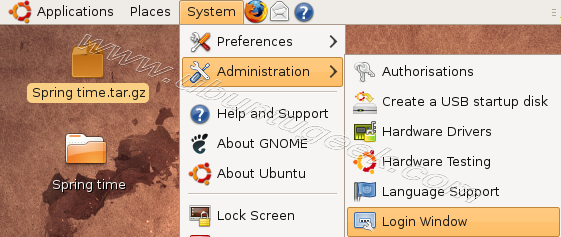
When it prompted enter your password, once login window opens you should see similar to the following screen here click on local tab .Now you can add your .tar.gz files for this click on Add

Once it opens file selection window select your GDM file click install (In this example i am installing Spring time GDM theme) or you just drag and drop your .tar.gz file into themes

Now you can see your newly installed theme under themes list select your new theme click close

You need to logout from your system to see your new GDM login theme
@Rusho Klick on Applications=> Ubuntu Software Center => Search for Gnome Art and you wil find the Art Manager.
After you install this you can download and install the themes from the gnome art website.
help me…i want to add GDM theme in my linux blankon…
how to do it on ubuntu studio
gdm there is no software in my ubuntu 10.10 how to install login window
please help me
Hello Dukes, i have installed natty, i couldn’t see such menu in my machine, it just being with simple options, and no other tabs are there,. Now what should i do then?:-(
There is no login window in ubuntu 11.4 ,only login screen and there is no themes option in login screen at all
help…………?
me elese on gdm software in ubuntu10.10
how to install theme in ubuntu 11.10
help me!!
how to install gdm theme tar.gz on ubuntu lucid