
Install Pidgin Instant Messanger in Ubuntu
Posted by admin on April 18th, 2007
Email This Post
Install Pidgin in Ubuntu
Download pidgin beta using the following command or from here
wget http://vicox.net/ubuntu/pidgin_2.0.0beta7devel.vicox-1_i386.deb
Install the .deb package using the following command
sudo dpkg -i pidgin_2.0.0beta7devel.vicox-1_i386.deb
This will install all the required packages for pidgin.
If you want to open pidgin go to Applications—>Internet—>Pidgin Instant Messanger

Once it opens you should see similar to the following screen here you need to click on add

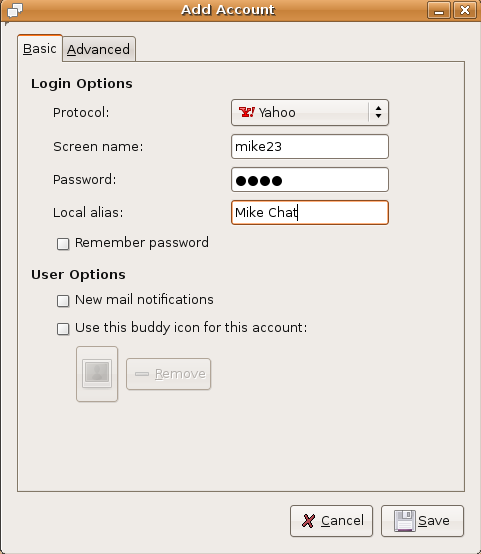
Now you need to add your username and password and click on save
Once you loggedin you should see similar to following screen

Pidgin Supported Protocols list

Pidgin Version Details

If you want to be notified the next time we write something please subscribe to our RSS feed.Thanks for Visiting!


April 18th, 2007 at 9:38 pm
Lame name, but cool facelift for the client.
Too bad I can’t use it in Feisty. Removing Gaim also removes ubuntu-desktop, because of this annoying bug: https://bugs.launchpad.net/ubuntu/+source/ubuntu-meta/+bug/90803
Installing ubuntu-desktop after installing Pidgin works, but then I have a nice broken package
April 19th, 2007 at 10:47 pm
Molgar, you can repair the broken package very easy. Just find ‘nautilus-sendto’ in Synaptic, mark it for ‘Removal’ (not complete). Apply, then install it again, after that install ‘gaim’ again, after GAIM ‘ubuntu-desktop’ and you have no more troubles…
April 20th, 2007 at 9:25 am
One correction - after doing desctribed steps you must REINSTALL the following packages:
gdm (2.18.1-0ubuntu1)
gnome-bin (1.4.2-35)
gnome-core (1:2.14.3.3ubuntu1)
gnome-desktop-environment (1:2.14.3.3ubuntu1)
gnome-libs-data (1.4.2-35)
if you want to load into GNOME
April 21st, 2007 at 7:57 pm
sudo dpkg -i –force-overwrite –force-bad-verify –force-conflicts –force-overwrite-dir pidgin_2.0.0beta7devel.vicox-1_i386.deb
This will do the trick. After installing Pidgin with this, GAIM even still works.
April 22nd, 2007 at 6:31 am
Guys,
Just installed it. But how can I remove it? Because it’s making something not working at the moment. For example,tried to install the new linux kernel,but it won’t work.
April 25th, 2007 at 3:02 pm
Hi, am looking for a someone to hold my hand while I get use to using ubuntu. I never was a power user on XP , just a internet surfer and downloader but I got tired of always having to reinstall windows every 6 months after I would install something that would break it or just how it would seem to get so cluttered after time.
I tried using the ubuntu forums but I have a hard time searching through the other threads to see if my question was already asked or if I found a question similar to mines it doesn’t work. I am sorry I still look at stuff with my widows glasses thats why am asking for help, so I can do stuff the right way and in return when I get better using ubuntu I can return the favour and help someone out when its my turn.
I am not sure whether am going to post this around on this site til I get a few takers so please forgive me if you see this anywhere else.
my email is bahamiandude1(at)gmail(dot)com
and no I didn’t get Pidgin installed properly I just got this error
sudo dpkg -i pidgin_2.0.0beta7devel.vicox-1_i386.deb
dpkg: error processing pidgin_2.0.0beta7devel.vicox-1_i386.deb (–install):
cannot access archive: No such file or directory
after i did as bravemosquito suggested (‘nautilus-sendto’ in Synaptic, mark it for ‘Removal’ (not complete).
May 1st, 2007 at 7:17 am
Hey baha.
You have the command right, you just have to navigate to the directory where you saved the package with the “cd” command. If you saved it on the desktop it will look something like this..
“cd /home//Desktop/”
another easy way of installing a package is just to double click on it.
Just a fair warning though.. in order to install pidgin, the previous version of gaim needs to be uninstalled. to uninstall gaim you have to uninstall the ubuntu-desktop package… I’m not sure if this is advisable or not. you can try it though.
to uninstall gaim execute this..
“apt-get remove gaim”
then you can install pidgin.
May 3rd, 2007 at 2:04 am
The message board turns two hyphens into a long dash
sudo dpkg -i --force-overwrite --force-bad-verify --force-conflicts --force-overwrite-dir pidgin_2.0.0beta7devel.vicox-1_i386.debthat it what he meant.
It installs this way, but I still don't get the shortcut in the menu.
May 3rd, 2007 at 9:17 am
Can the author of this binary package maybe provide us with the source package?
This way we could check that nothing harmful is in it, compile it for other architectures (I am using amd64 for example), compile it for older version of Ubuntu and last not least improve it, if necessary. Thanks!
May 5th, 2007 at 7:06 pm
Stefan Tittel,
The only way to ensure that is to compile the source by yourself. It is available at, you guessed it, http://www.pidgin.im/
Best Regards
May 5th, 2007 at 7:11 pm
Just to let you know, you can also get it from http://www.getdeb.net which has the 32 and 64 bit versions of Pidgin for Feisty. They also have a bunch of other very nice programs/upgrades that you can check out there.
http://www.getdeb.net/app.php?name=Pidgin
May 5th, 2007 at 11:45 pm
(Reading database … 133522 files and directories currently installed.)
Unpacking pidgin (from pidgin_2.0.0beta7devel.vicox-1_i386.deb) …
dpkg: error processing pidgin_2.0.0beta7devel.vicox-1_i386.deb (–install):
trying to overwrite `/usr/share/dbus-1/services/gaim.service’, which is also in package gaim
dpkg-deb: subprocess paste killed by signal (Broken pipe)
Errors were encountered while processing:
pidgin_2.0.0beta7devel.vicox-1_i386.deb
May 6th, 2007 at 2:30 am
I got the same problem as Naralas. Any ideas??
May 6th, 2007 at 3:36 pm
Try this one instead: http://www.getdeb.net/app.php?name=Pidgin
Or wait a week or two, so that Pidgin hits the official repos.
May 7th, 2007 at 8:30 am
Did all of this and now i have a broken package which cannot be fixed through apt-get -f install. Pidgin is buggy and won’t work. Cannot remove Pidgin or install Gaim because of the broken package issue. What do I do? Feisty reinstall looks likely…
May 7th, 2007 at 3:33 pm
@hudwa
to fix do this.
sudo dpkg –remove pidgin
sudo apt-get -f install
sudo apt-get update
sudo apt-get upgrade
voila!
May 7th, 2007 at 3:51 pm
Thank you! All better, but my initial reason for trying to install Pidgin now remains, Gaim won’t open! I try to open it from Applications or terminal and the “Starting Gaim Instant Messenger” button appears, remains for about 15 seconds then disappears and I have no Gaim. I tried reinstalling from Synaptic, but no good. Any ideas?
May 8th, 2007 at 4:02 am
have you tried this?
sudo apt-get -f install gaim ?
May 8th, 2007 at 7:15 pm
Hi
I have successfully install Pidgin on Feisty, however there is no sound, as there used to be in Gaim. I still have Gaim installed. Any ideas?
May 9th, 2007 at 11:27 am
Does anyone know where I can get a deb of Pidgin 2.0.0 (final) for Edgy?
May 10th, 2007 at 3:35 am
@Haleq:
I hit the same snag. I installed a package called “bplay” (just used Synaptic). In the Pidgin preferences panel, on the Sound tab, set the Sound Method as “Command” and Command as “bplay %s” (without the quotes of course). This worked for me without any further configuration on my part (using Xubuntu 6.10 Desktop i386 on a Gateway 4520GZ laptop).
I don’t know if there’s a program already installed that will do this (I’m not a patient person - I just searched in Synaptic and found this).
Thanks for the tutorial from a Linux enthusiast who’s not that Debian literate (Gentoo mainly).
Hi
I have successfully install Pidgin on Feisty, however there is no sound, as there used to be in Gaim. I still have Gaim installed. Any ideas?
Hope this helps…
Peace,
Chris
May 10th, 2007 at 3:24 pm
Gaim instant messenger renamed to Pidgin…
I just realized last night that Gaim has been renamed to Pidgin.
Extracts from Pidgin website (http://pidgin.im)
We’ve got a new name, a new look, and a ton of new features, but we’re still the same old instant messaging client you know an…
May 11th, 2007 at 6:22 pm
Wouldn’t it be nice if the ubuntu repository was updated so the next apt-get update; apt-get upgrade I performed migrated me to pidgin, or at least was add as an alternative IM
May 14th, 2007 at 1:46 pm
For a more recent - an not beta - version of pidgin check this polish ubuntu repository.
filters 2 cents
May 14th, 2007 at 1:47 pm
Oops - here is the missed link to the polish ubuntu repository ->
http://download.ubuntu.pl/_Feisty_Fawn/pidgin/
June 1st, 2007 at 4:42 am
I used dexters line:
June 8th, 2007 at 3:06 pm
Naralas & Deryck:
You need to remove the package “gaim” before you can install Pidgin. This is because Pidgin overwrites some of the gaim directories, easiest way is to just remove it via Synaptic. Removing gaim will also remove nautilus-sendto and ubuntu-desktop keep in mind, however these are just gaim plugins anyway.
June 18th, 2007 at 7:43 pm
Just to report that I installed Pidgin from the first link (http://vicox.net/ubuntu/pidgin_2.0.0beta7devel.vicox-1_i386.deb) on Ubuntu Edgy and it worked without *any* hassle. I used Synaptic to uninstall gaim which prompted for removal of nautilus-sendto and ubuntu-desktop. I left the gaim-data package intact. Next, I installed Pidgin from the deb file. It appeared under the Internet menu and when I started it, it also picked up all the accounts that I had configured in Gaim. All this in under 10 minutes.
June 20th, 2007 at 5:38 pm
i needed to use: sudo dpkg -i –force-overwrite –force-bad-verify –force-conflicts –force-overwrite-dir pidgin_2.0.0beta7devel.vicox-1_i386.deb
it looks like it was successful, but now how do i actually launch pidgin? i don’t see it in any menus?
June 20th, 2007 at 10:57 pm
you can press CTRL + F2 and type pidgin
or
open a terminal and type pidgin&
June 20th, 2007 at 10:58 pm
oops! ALT + F2 not CTRL+F2
June 21st, 2007 at 5:14 pm
hey
I’ve upgraded from Gaim to Pidgin without any problems with the software, but my connection as it relates to Pidgin won’t work.
I’ve got my accounts configured the way I want them, and I’ll try to sign in. After about half an hour, the connection will time-out and I can’t sign-on at all.
Any ideas? I’ve heard that my router could be blocking the ports that Pidgin wants to use, or that it could be my firewall, but seeing as I haven’t got one of those, it’s not likely.
June 22nd, 2007 at 8:20 am
woohoo!
Just got the debs from getdeb.net of Pidgin 2.0.2 and decided to blindly install with gaim (2.0 beta6) still installed, and it went perfectly!
Everything is how I left it - same profile data, accounts, passwords, even my away msg is still up :P! The only that was the initial connection took about 10 seconds and had me slightly worried for a few seconds.
Just tested and gaim still works too
August 18th, 2007 at 1:49 pm
I use Slackware and there is ‘play’ - play sound files. I use it to play sound on events
‘play –file=%s’
August 23rd, 2007 at 3:21 pm
ubuntu-desktopis a metapackage that depends on all the other packages that make up the ubuntu desktop but doesn’t actually contain any code/software itself - it is perfectly safe to remove once ubuntu is installed.September 12th, 2007 at 7:53 pm
I went to getdeb.net and got the version of Pidgin for the AMD 64, since the specific one mentioned here didn’t apply to me. However, upon trying to open it, I get a package installer screen that will not allow me to click the “Install Package” button. Instead, it says, “Status: Error: Dependency is not satisfiable: pidgin-data”. Ilp am a complete n00b when it comes to Ubuntu, but I have been trying it out for a day and have been on forum after forum looking for answers. Any help is much appreciated.
September 12th, 2007 at 8:20 pm
I have answered my own question, thank you.
September 13th, 2007 at 8:03 pm
I have installed okay but without xmpp how can I get gtalk to work?